

 1300 71 61 41
Why is this hack helpful?
Not all customers are created equal. Your first-time buyer who just took a chance on your brand needs a different message than your loyal superfan who's made their tenth purchase this year. But here's the problem: if you're sending the same generic "thanks for your order" email to everyone, you're missing a golden opportunity to build deeper relationships and drive repeat purchases.
The solution? Use HubSpot workflows to automatically segment customers based on their purchase history and send them targeted, relevant emails that match exactly where they are in their customer journey. Welcome emails for newbies, loyalty rewards for your VIPs, and re-engagement campaigns for those in between. It's like having a personal assistant who knows exactly what each customer needs to hear!
By tailoring your post-purchase emails based on order count, you can create a customer experience that feels personal and thoughtful. First-timers get welcomed and educated. Regular customers get rewarded. VIPs get the red carpet treatment. Everyone wins!
Initial Preparation
First, make sure you have Order stages properly configured. Generally, this is where Ecommerce platforms, such as Shopify, sync orders into HubSpot. If you haven't set this up, you can view the HubSpot and Shopify Data Sync knowledge base here.
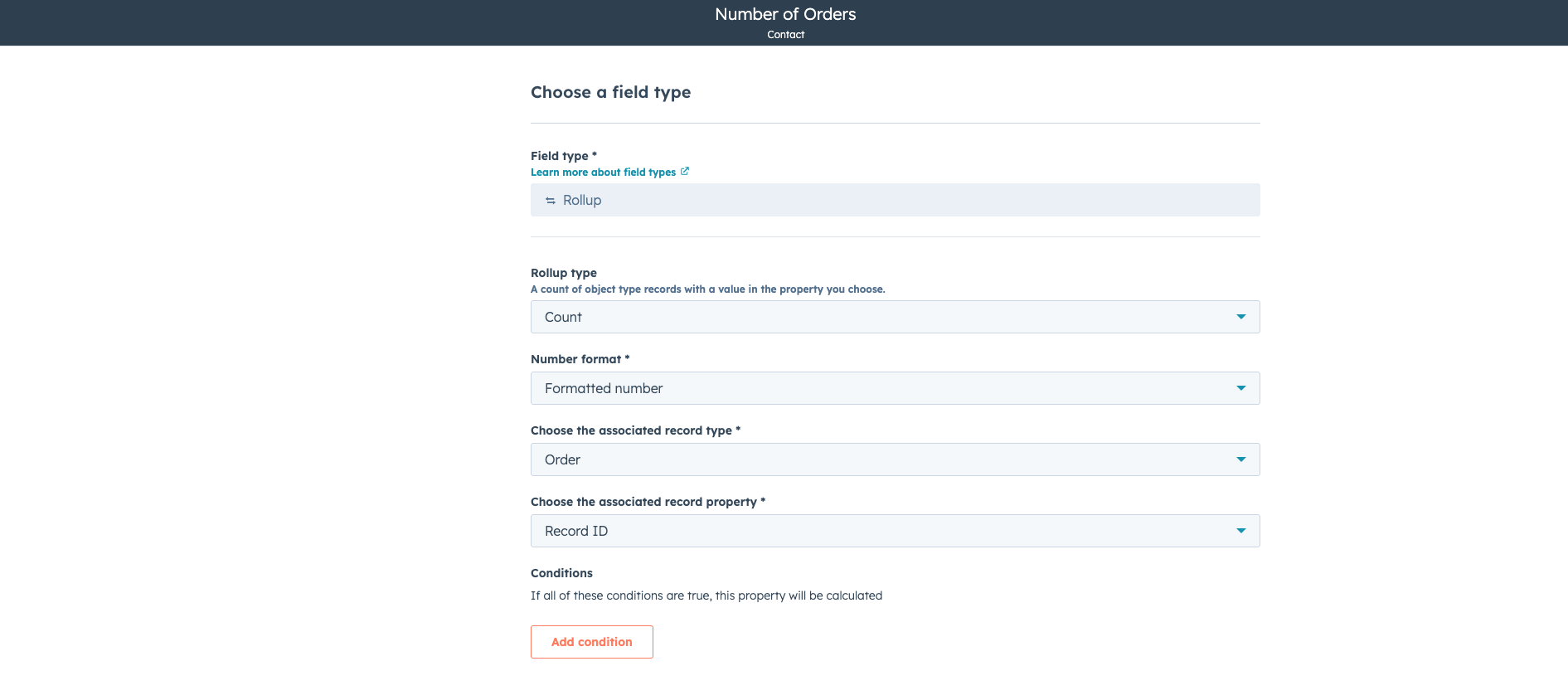
Secondly, we need to create a rollup property to count the number of orders a contact has made. If you navigate to Settings > Properties > Contact Properties > Create new property > Number of Orders.
When choosing the field type, select the following:
- Field Type: Rollup
- Rollup Type: Count
- Number format: Formatted Number
- Associated Record Type: Order
- Associated Record Property: Record ID
This will track the number of orders a Contact has made.
Building Your Ecommerce Purchase-Triggered Email System
Now, let's create a workflow that automatically detects when someone makes a purchase and sends them the perfect email based on their order history. This is where the magic happens!
-
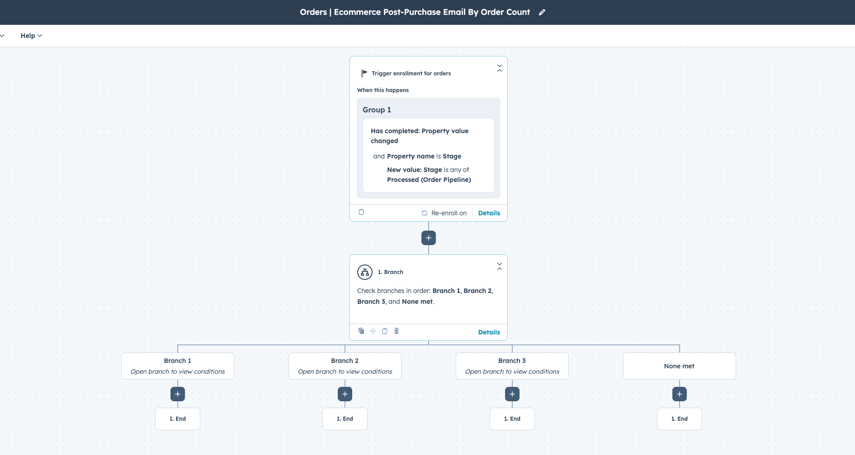
Go to Workflows > Create Workflow > From scratch > Data Values > Property Value Changed > Order Based.
-
Set the enrolment trigger property to be to Stage is any of Processed.
- Processed is the default stage in Orders for when a payment is taken and an order is placed in Shopify.
-
Enable re-enrolment so the workflow fires every time someone makes a new purchase.
-
Now add a Branch based on the Associated Object: Contact and the Rollup property we created.
-
Create your segments:
-
Branch 1: Number of associated deals is exactly 1 (first-time customers)
-
Branch 2: Number of associated deals is between 1 and 5 (repeat customers)
-
Branch 3: Number of associated deals is 5 or more (VIP customers)
-
-
In each branch, add a "Send email" action with your targeted email template
-
Give your workflow a descriptive name like "Orders | Ecommerce Post-Purchase Email By Order Count"
-
Turn it on–after you have created your segmented email templates.
Tips for Creating Segmented Email Templates
Now for the fun part - creating emails that speak directly to each customer segment! Here's what to include in each:
First-Time Customer Email (1 purchase)
This is all about validation and education. They took a chance on you - now build their confidence!
-
Warm welcome and genuine thanks
-
Reassure them about their purchase decision
-
Share helpful getting-started tips or how-to guides based on your product or offering
-
Introduce your brand story and values
-
Offer support channels if they have questions
-
Maybe include a small "first-time customer" discount for their next purchase
Subject line ideas: "Welcome to the [Brand] family! 🎉" or "Thanks for giving us a try! Here's what's next..."
Repeat Customer Email (2-4 purchases)
They like you! They really like you! Now deepen that relationship.
-
Acknowledge they're a valued repeat customer
-
Share exclusive tips or insider content
-
Highlight complementary products they might enjoy
-
Offer a "thank you" discount (10-15% off)
-
Ask for feedback or a review
-
Tease upcoming products or sales
Subject line ideas: "We noticed you're back! Here's something special" or "For our favourite repeat customers..."
VIP Customer Email (5+ purchases)
Roll out the red carpet! These are your brand champions.
-
Celebrate their VIP status explicitly
-
Offer a more generous reward (20% off, free shipping, early access to sales)
-
Invite them to an exclusive loyalty program
-
Share a sneak peek of new products before anyone else
-
Consider adding a personal note from the founder
-
Ask if they'd like to join your referral or ambassador program
Subject line ideas: "You're officially a VIP! Here's your exclusive reward 🌟" or "Our top customers get first dibs..."
Taking It Further: Advanced Segmentation
Once you've got the basic workflow running smoothly, level up with these enhancements:
-
Add time delays: Wait 1-2 days after purchase to send the email, so customers have received their order. You can also trigger the workflows to run based on Fulfilment, rather than Processed.
-
Product-specific branches: Create different email paths based on what category of products they purchased.
-
Combine with engagement data: Only send VIP emails to customers who also have high email engagement scores
-
Create a priced-based workflow: Instead of counting deals, you could use a price-based system. To create a property that counts dollar values, you can create a rollup property with the following attributes:
- Field Type: Rollup
- Rollup Type: Sum
- Number format: Currency
- Associated Record Type: Order
- Associated Record Property: Total Price
Wrapping Up
And there you have it! Your customers are no longer just "customers", they're first-timers getting welcomed, regulars getting appreciated, and VIPs getting the star treatment they deserve. This automated workflow creates a personalised experience that scales with your business, turning one-time buyers into loyal brand advocates.
The best part? Once it's set up, this runs completely on autopilot. Every new purchase automatically triggers the right email, with the right message, at the right time. Your customers feel seen and valued, and you see higher engagement, better retention, and increased lifetime value. Win-win!
Need help setting up your workflows? Get in touch with us today! We promise we won't send you generic boring emails 😉


.svg)





