

What Actually Makes People Abandon Your Checkout
Checkout abandonment is a revenue number sitting in analytics you already pay for. Here is what to fix, in the order worth fixing it, and the Australian rule most checkout advice skips.

Every checkout has two numbers attached to it: how many people started and how many finished. The analytics that shows you both is already running on your site, and most teams have never looked at it broken down by step.
That is why the checkout is usually the cheapest revenue in the business to recover. These are people who have already decided to buy. You are not persuading anyone, you are removing reasons to stop.
The seven steps, and where people leave
Nearly every checkout runs the same sequence. The customer:
- Adds the item to the cart
- Reviews the cart
- Enters personal and shipping details
- Enters payment details
- Reviews the order
- Places the order
- Receives confirmation
Instrument each of those as its own step in your analytics before you change anything. The point is not the total abandonment rate, which tells you nothing you can act on. The point is which of the seven steps loses the most people, because the fixes are completely different depending on the answer. Most retailers who do this find their loss concentrated between the shipping details and the payment step, which points at cost surprises rather than at form design.
Fix the cost surprise first
An unexpected charge at the payment step is the single most common reason a decided buyer walks. Not the amount, the surprise. Someone who has mentally committed to $89 and sees $103.99 stops to reconsider the whole purchase.
Show every additional cost in the cart, before the customer starts typing. Shipping, handling, surcharges, anything that is not in the product price. If shipping depends on the address, show a rate estimate or a plain statement of the range rather than a blank.
This is the cheapest fix on this list and it is usually the biggest.
Let people check out as a guest
Forcing account creation asks for commitment at the exact moment you want a decision. A guest checkout removes two factor prompts, forgotten passwords, and the reasonable suspicion of someone who does not want a relationship with your brand yet.
You still get the order, the email address for the transaction, and the chance to offer an account on the confirmation page.
Make it work on a phone
Most e-commerce platforms ship a mobile ready checkout by default. What breaks it is your own customisation: a custom layout, a call to action that pushes the total below the fold, a form that triggers the wrong keyboard for a postcode.
Test the whole sequence on an actual phone, not a narrow browser window. It takes ten minutes and it is the last time anyone will look at it for a year. If the site's design is being rethought more broadly, it is worth reading alongside growth driven design rather than treating checkout as a separate project.
Reduce the typing
Typing an address on a phone is the most tedious part of buying anything online, and every character is a chance to give up.
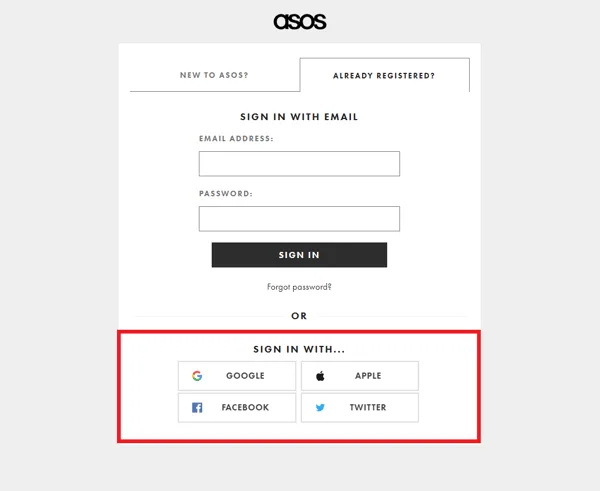
Two things help. For customers with an account, let them save details so the second purchase takes seconds. And offer social sign in, which lets someone use an existing Google, Facebook, Apple or LinkedIn account rather than filling out a registration form. Both remove typing rather than adding features.
Offer the payment methods your customers use
Know which checkout step loses your shoppers?
Every store has the abandonment rate, few have the reason.
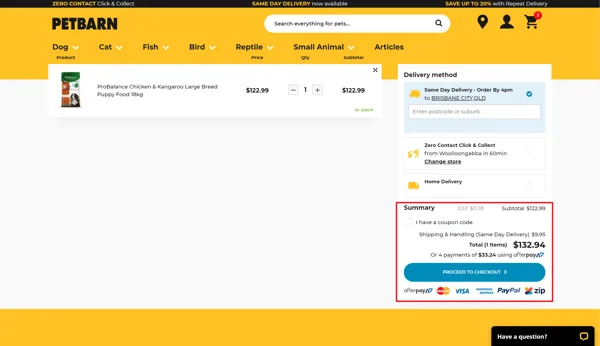
Getting to the payment step and not finding your preferred method is a hard stop. PayPal, Apple Pay, Google Pay, cards, and whatever else your market expects.
Each method costs you something in fees and in integration maintenance, so this is not a case of adding everything. Look at where your customers actually are and cover the major methods for those markets. Two well supported options beat six half configured ones.
Show where they are, and how to get help
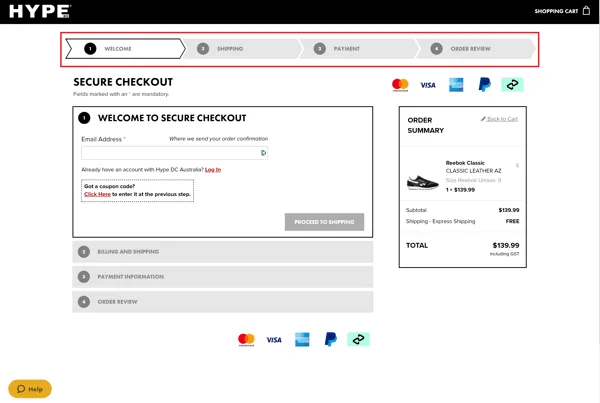
A progress indicator tells someone how much more of this there is, and lets them go back to a step without starting again. It costs nothing and it removes the feeling of being trapped in a form of unknown length.
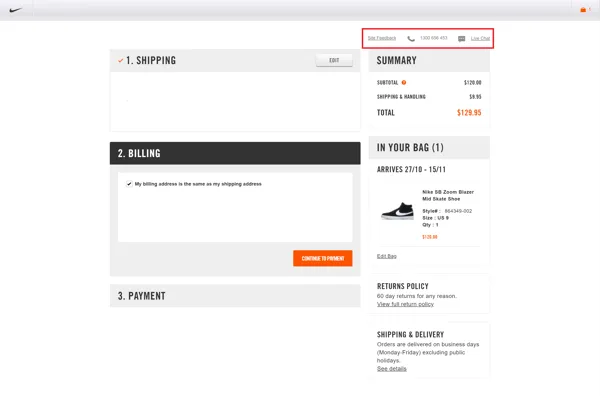
Put contact details on the checkout pages too: a phone number, an email address, or live chat. Very few people use them. The ones who do are usually about to abandon over something you can answer in one sentence.
Give them a reason to trust the page
People are wary of handing card details to a site they do not recognise, and that wariness is rational. The fixes are cheap.
Have an SSL certificate across the whole shop rather than just the checkout, because without it the browser itself warns visitors away before you get a chance to reassure anyone. Show the badges of the payment and security providers you genuinely use. And keep the order review step, so the customer sees exactly what they are about to be charged before they commit. That last one also cuts returns and support tickets, which is where it pays for itself.
The opt-in box, and the rule most checkout advice skips
Somebody will want a marketing tick box on your checkout. Fine, but get it right, because this is the one part of a checkout with an Australian rule attached.
Under the Spam Act 2003, express consent means the person knew and accepted that they would receive marketing from you. So leave the box unticked and label it in plain words. A pre-ticked box does not show that anyone knowingly accepted anything, and the burden of proving consent sits with the sender, not the recipient.
Inferred consent is narrower than most people assume. It applies where someone knowingly and directly gave you the address and it is reasonable to believe they would expect marketing, which usually means a provable ongoing relationship with the marketing directly related to it. A single purchase is a thin basis for a weekly promotional email. ACMA sets out its consent expectations for direct marketing plainly enough to read in one sitting.
Two more things that follow from this. Store what the customer chose as its own field, and make that field the one your marketing lists filter on, so order data drives segmentation and consent drives enrolment. And every commercial message you send afterwards needs an unsubscribe option that does not require extra personal information, a login or an account, and has to identify the business that authorised it, by correct legal name, or name and ABN. ACMA's guidance on avoiding spam covers both.
The confirmation email is part of the checkout
The purchase does not feel finished until something arrives. Send it immediately, with the item, the variant, the price, the taxes, the tracking link and an estimated delivery date.
The estimated date matters more than the rest. The customer is now waiting for a physical object with no idea whether that is two days or two weeks, and the uncertainty is what generates the support ticket. Once that email is going out reliably, it is also the natural place to build from, and there is a walkthrough of automating follow up email off purchase history.
Where to start
Break your checkout into the seven steps in your analytics and read the drop off for one month. Fix the worst step. Read it again.
Not sure how much of your checkout you can change?
Most stores run into the platform's limits first.
That is the whole method, and it beats working down a list like this one in order, because your checkout is losing people somewhere specific and you can find out where by Thursday. Every business is different, and nothing here replaces asking a handful of customers what stopped them.
Treating the site as part of how the business runs rather than as a brochure is what our Operating Systems and Websites work is about. If your checkout numbers look wrong and you cannot tell where, send us the step breakdown and we will tell you what we would fix first.