

How to Stop Emailing the Contacts Who've Stopped Reading
HubSpot has no fatigue property, so you build one out of Sends since last engagement. It protects your sender reputation, and it keeps your consent position defensible.

HubSpot has no fatigue property, so you build one. The ingredient is the "Sends since last engagement" filter, and the whole thing is one workflow with four branches.
How to Build the Workflow:
- Create a New Workflow: Start from scratch.
- Set Enrolment Triggers: Use criteria like:
- Marketing contact status is active.
- Contact has not opted out of emails.
- Contact has a valid email address.
- Add If/Then Branches: Use engagement data to categorise contacts:
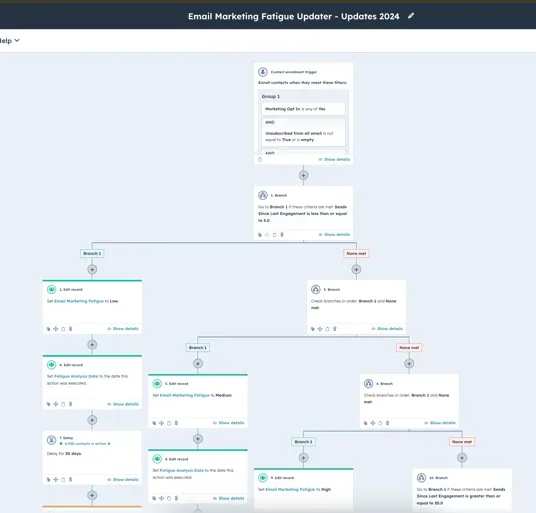
- Branch 1: "Sends since last engagement ≤ 5" → Set fatigue level to "Low."
- Branch 2: "Sends since last engagement ≤ 10" → Set fatigue level to "Medium."
- Branch 3: "Sends since last engagement ≤ 15" → Set fatigue level to "High."
- Branch 4: If none of the above → Set fatigue level to "Very High."
- Update the Property: Add an action in each branch to update the fatigue level.
- Optional: Add a date property to track when the fatigue level was last updated.
- Keep It Dynamic: Add a delay and re-enrolment trigger so the workflow keeps updating over time.
This workflow essentially creates a fatigue tracker by using HubSpot's "Sends since last engagement" filter. It's a simple but effective way to keep your contact records up to date.
There's a second reason to track this, and it isn't about engagement rates. Under the Spam Act 2003, consent is either express or inferred, and ACMA's guidance puts the burden of proof on the sender. A contact who hasn't opened anything in fifteen sends is exactly where inferred consent is weakest: whatever the original basis was, it is the hardest one to stand behind now. At the volume a 60 to 200 person business sends, it's a deliverability question too, because mailing people who never open teaches the inbox providers to filter the ones who would have.
Step 3: Nurture Fatigued Contacts
Not sure how many of your contacts have gone quiet?
Send volume looks healthy right up until you segment it.
Once you've identified your fatigued contacts, it's time to nurture them. The goal here is to re-engage them with thoughtful, targeted campaigns.
What to Check Before You Nurture:
- Check for Bounces: If your very high fatigue contacts are bouncing, it's time to remove them from your campaigns.
- Plan for Non-Engagers: Decide what to do with contacts who don't respond to your nurture efforts. You could add them to an "un-engaged/high-fatigue" list, and use that as an exclusion list for marketing activity. You can also use a workflow to set contacts in that list as non-marketing.
- Check Where the List Is Already Used: Before you wire an exclusion list into anything, see what depends on it. Here's reporting on active list usage in your workflows.
- Separate Fatigued From Dead: A contact who has stopped reading and a contact who was never real are two different problems with two different fixes. Scoring your dead HubSpot contacts in five minutes handles the second one.
How to Build the Nurture Workflow:
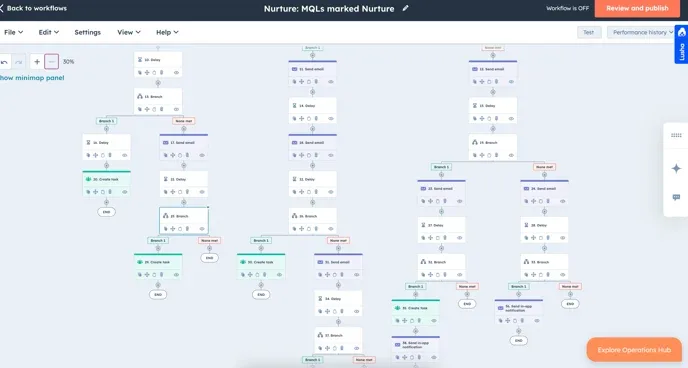
- Enrol Contacts: Use the fatigue property to enrol high and very high fatigue contacts.
- Design the Sequence: Create a series of emails to re-engage these contacts:
- Start with a friendly "We Miss You" email.
- Follow up with exclusive content or a special offer.
- End with a "Last Chance" email before removing them from your list.
- Monitor Results: Track engagement and adjust your strategy based on how contacts respond.
This nurture sequence gives fatigued contacts a chance to re-engage while making sure you're not spending budget on people who are no longer interested. The same thinking works on the sales side, where blocking sequence enrolment based on recent activity stops a rep piling on top of a contact marketing is already chasing.
Step 4: Maintain and Monitor Fatigue Records
With your workflows in place, the system will mostly run itself. However, there are a few things you'll want to keep an eye on so it stays effective.
Tips for Ongoing Management:
- Update Criteria: If your email frequency changes, adjust the workflow to reflect the new cadence.
- Handle Highly Fatigued Contacts: Decide what to do with contacts who don't respond to your nurture efforts.
- Track Trends: Add a report to your marketing dashboard to monitor fatigue levels over time. If you notice a spike in fatigued contacts, it might be time to rethink your email strategy.
Give it an afternoon. What you get back is a list where you know who is still reading, and a defensible answer when someone asks why you are still emailing a contact who last opened something in 2021. If you'd rather build it with us, that's our RevOps and HubSpot service page.
Built the fatigue list and unsure what to send them?
Most fatigue lists get built once and then never used.