

HubSpot's Sales plugin for Claude: what each skill does
A free plugin that adds eight sales skills to the HubSpot connector for Claude, from Call Prep to Log Call. Set the connector's write tools to Needs Approval before your reps install it.

HubSpot's Sales plugin for Claude is a free download that adds eight sales skills on top of the HubSpot connector for Claude: Call Prep, Daily Brief, Log Call, Follow Up, Pipeline Pulse, Contact Lookup, Import Contacts and a general HubSpot skill. HubSpot announced it on 25 September 2026. You install it in Claude with Add, then Upload Plugin, sign in to HubSpot, and each skill runs from a slash command such as /call-prep or from a plain request.
With it, a rep's day runs from one Claude chat. A prioritised list of deals and overdue tasks first thing, a brief before each call, a spoken debrief after it that Claude turns into notes, a deal stage change and a follow-up task, and a follow-up email drafted and saved in HubSpot for the rep to send. The CRM stays current because keeping it current now takes one sentence after a call.
The decision to make before anyone installs it is whether Claude may write to HubSpot without a person saying yes. HubSpot says the plugin shows each proposed change and asks the rep to confirm. Back that up at the connector level by setting its write tools to Needs Approval, and decide who on the team gets the write skills at all.
What does each skill in the HubSpot Sales plugin do?
Three of the eight skills only read your CRM, and Contact Lookup only changes a record if the rep asks it to. The other four create or change records, so your sales manager should understand them before the team starts.
| Skill | Command | What HubSpot says it does | A realistic sales use | Writes to HubSpot? |
|---|---|---|---|---|
| Call Prep | /call-prep | A pre-call brief with deal history, recent notes, open tasks and company context | Five minutes before a renewal call, the rep asks what changed on the account since the last meeting | No |
| Daily Brief | /daily-brief | A prioritised view of open deals, overdue tasks and stalled contacts, with suggested next steps | The first thing a rep runs each morning, in place of scrolling the deals board | No |
| Log Call | /log-call | Takes a plain-language debrief, records the notes, updates the deal stage and creates follow-up tasks | Straight after a discovery call, from the car park: "They want a proposal by Friday, Priya signs off" | Yes: notes, deal stage, tasks |
| Follow Up | /follow-up | Drafts a follow-up email from deal context and call history, saved to HubSpot to send or schedule | The recap email after a demo, written from what was actually said on the call | Yes: an email draft |
| Pipeline Pulse | /pipeline-pulse | Finds stalling deals, missing next steps and items needing attention | A rep's own pipeline tidy before the weekly forecast meeting | No |
| Contact Lookup | /contact-lookup | A full contact profile: deal status, lifecycle stage, last interaction, open tasks and company, and you can act on it in the chat | An inbound call from someone the rep does not recognise | Only if the rep asks it to |
| Import Contacts | /import | Adds contacts from a CSV, a pasted list or an email, with field mapping and duplicate detection | Twenty business cards from a trade show, typed into a list | Yes: new contacts |
| HubSpot | /hubspot | The catch-all for lookups, field updates, stats and account questions | "How many deals did I close last quarter, and which were over $20,000?" | Yes, when asked |
One limit is worth knowing for Import Contacts. HubSpot's connector documentation says bulk creates and updates run 10 records at a time, and every request counts against your portal's API limits. A list of twenty is fine. A list of 4,000 belongs in HubSpot's own import tool.
What does a rep's day look like with it?
Here is the shape we would expect for an account executive at a 120 person business selling a considered B2B product.
- Before nine. Daily Brief lists the deals that need a touch today, the overdue tasks and the contacts who have gone quiet. The rep reads it and picks their three calls.
- Before each call. Call Prep pulls the deal history, the last notes and the open tasks into one brief, so the rep stops opening five tabs to piece it together.
- After each call. Log Call takes a rambling debrief and turns it into a tidy note, a stage change and a dated task. Claude shows the change, the rep confirms it.
- Straight after that. Follow Up drafts the recap email from the same context and saves it in HubSpot. The rep edits the tone and sends it from HubSpot, so it is logged against the contact.
- Thursday afternoon. Pipeline Pulse finds the deals with no next step and the close dates already in the past, before the sales manager does.
The gain for a head of sales is the data. Call notes and next steps get logged because the rep only has to say them once, out loud, after the call. Better data means better forecasts and better reporting off the back of them. If you want a fixed weekly review for the manager on top of this, our seven Claude prompts for a weekly pipeline review work on the same connector.
The flow HubSpot describes for Call Prep, Log Call and Follow Up, with the connector's write tools set to Needs Approval.
What does it ask before it writes to HubSpot?
HubSpot's announcement says: "Before Claude writes anything to your account, it shows you the proposed change and asks you to confirm." That covers Log Call, Follow Up, Import Contacts and any update a rep asks the HubSpot skill to make.
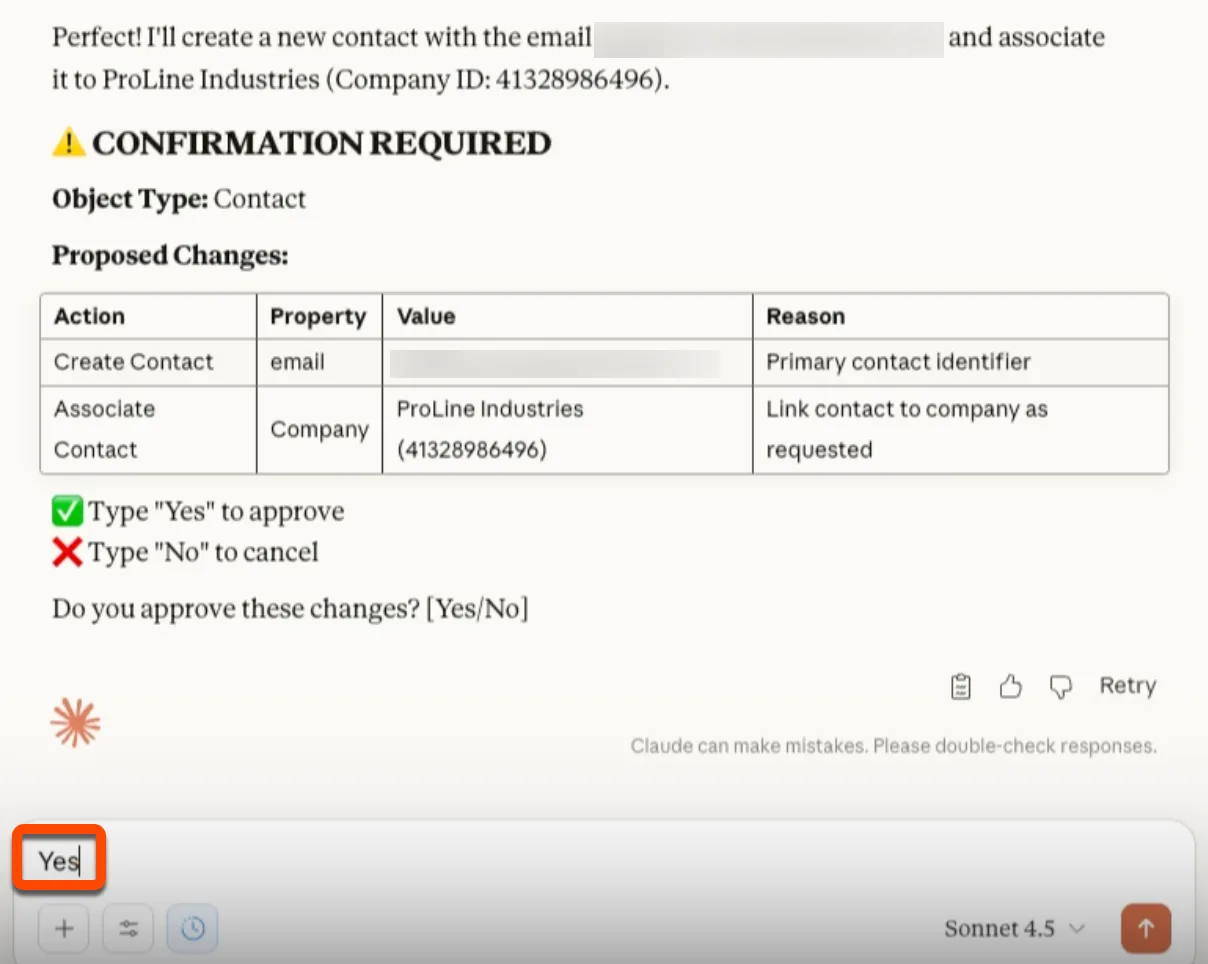
That is the plugin's promise. Put your own setting underneath it. The connector has a Write tools permission in Claude. Set it to Needs Approval and Claude has to ask before every create or update, whichever skill or prompt triggered it. HubSpot's own documentation warns that on Always allow, edits may happen without asking.
This video from our YouTube channel covers where AI needs a person checking its work, and where it does not.
Three more rules sit with the connector, and they apply to every plugin skill because the skills run through it:
- It cannot delete. The connector supports view, create and update. A rep can still delete in HubSpot itself.
- It sees what the rep sees. Each person signs in with their own HubSpot login, so their HubSpot permissions and team visibility apply. Fix those first if a junior rep can currently see every deal in the portal.
- Every change is under the rep's name. HubSpot records each create and update in the account's audit log, against both the rep and the Claude connector.
Who installs it, which permissions the connector gets, and what the Privacy Act expects before an AI assistant reads customer records are all covered in our guide to the Claude HubSpot integration. The controls we put on our own build are in Claude MCP and HubSpot: the controls we built first.
Which skills should your reps be allowed to write with?
We build on Claude and HubSpot for Australian sales teams, from custom skills to the integrations behind them. Talk to Matt about how your team sells today.
What changed on 30 October for Sensitive Data?
Some portals have HubSpot's Sensitive Data settings turned on, usually because they hold health or other sensitive details. Until now, HubSpot's connector documentation has said that in those accounts Claude cannot read any engagement data at all: no calls, meetings, notes or emails. For a sales team that makes Call Prep and Log Call close to useless.
HubSpot's October 2026 developer rollup, published 30 October, changes that through a beta. The detail from HubSpot's knowledge base:
- Super Admins opt in. A Super Admin has to configure AI connector access to Sensitive Data, during installation or reauthorisation.
- Claude, ChatGPT and Copilot get properties and engagements. Gemini and HubSpot's remote MCP server get engagements only.
- It is read only. Updates to engagements stay blocked in accounts with Sensitive Data, and users still need the object or property permissions in HubSpot.
- Highly Sensitive Data stays off limits. Those properties remain restricted.
- Enterprise only. The feature is listed for Enterprise subscriptions of Sales Hub, Marketing Hub, Service Hub, Data Hub, Content Hub, Smart CRM and Revenue Hub.
- Existing connections have to reconnect. Disconnect the connector in Claude, uninstall it from Connected Apps in HubSpot, then set it up again. HubSpot says the new permissions can take up to two hours to appear.
One catch to test for. HubSpot notes that some connectors may still not return a property whose name looks sensitive, and that this is decided by the AI provider's own safety rules, outside HubSpot's permissions. Try Call Prep on a real record after you reconnect.
- Super Admin opts inJoin HubSpot's beta for AI connector access to Sensitive Data, on an Enterprise subscription.
- Disconnect in ClaudeRemove the HubSpot connector from Claude.
- Uninstall in HubSpotRemove the app from Connected Apps.
- Set it up againA Super Admin configures Sensitive Data access as the connector is reinstalled.
- Allow up to two hoursNew permissions can take that long to appear.
- Test Call PrepRun it on a real record and check the properties you expect come back.
From HubSpot's October 2026 rollup and its knowledge base article on AI connector access to Sensitive Data. Access is read only.
Treat this as a governance decision before a technical one. Once Sensitive Data is readable, a rep's Claude chat can quote it back to them. Decide who actually needs that and write it down before anyone opts in.
How should a sales team roll it out in the first week?
Start small and read only, then add the write skills once you have seen what they produce. Training sales teams on HubSpot itself is part of our RevOps and HubSpot work.
| When | Who | What they do | What to check |
|---|---|---|---|
| Day 1 | Super Admin and the Claude owner | Approve the connector, set Write tools to Needs Approval, tidy HubSpot permissions and teams. On Team and Enterprise plans, the owner can distribute the plugin to the organisation through a plugin marketplace. | Each pilot rep sees only their own deals, or their team's |
| Days 1 and 2 | Three to five reps and their manager | Daily Brief, Call Prep, Contact Lookup and Pipeline Pulse only | Does the brief match what the rep knows about the deal? Note anything missing |
| Days 3 and 4 | The same group | Add Log Call and Follow Up | The manager reads every logged note and every stage change in HubSpot's audit log each afternoon |
| Day 5 | The RevOps or CRM owner | Try Import Contacts and the HubSpot skill on a test list | Duplicates, field mapping, lifecycle stage and owner on new contacts |
| End of week | Head of sales | Decide who gets it next, and which skills stay with the CRM owner | Fewer deals with no next step than last Friday |
Two things tend to come up in that first week. Reps start describing deal stages in their own words, so the manager agrees the exact stage names Log Call should use. And somebody asks Import Contacts to load an old spreadsheet with no source or owner. Keep that skill with one person until you trust what it writes.
For the wider company rollout, plans and training, see how to roll Claude out to a 100 person business.
Where does the plugin stop and a custom build take over?
The plugin knows HubSpot's standard objects and nothing about how your team sells. It does not know your stage exit rules, your qualification framework, your discount limits or which products need a technical sign-off. Its Call Prep follows HubSpot's idea of a good brief. That is a sensible place to start, and most teams find the gaps quickly.
| What you need | What does it | Example |
|---|---|---|
| The eight standard sales jobs | The Sales plugin | Daily Brief, Call Prep, Log Call |
| Your own process, followed the same way by every rep | A custom Claude skill, added to your own plugin | A stage exit check that refuses to move a deal to Proposal without a decision maker and a budget |
| Data that is not in HubSpot | A custom MCP server | Call Prep that also shows stock on hand from the ERP or product usage from your app |
| The same job on every record, with no rep asking | Claude in a HubSpot workflow | Every new inbound lead summarised and routed before a rep opens it |
A custom skill is the cheapest step past the plugin. It is a folder with your process written down, and Claude follows it every time. We explain the format and give a deal hygiene skill you can copy in how to make Claude follow your HubSpot process every time. When the data sits outside HubSpot, read how to build a custom MCP server for your CRM, and when not to.
The custom skills, MCP servers and workflow steps are what we build in our AI engineering work. AI projects start from A$10,000 ex GST. If you are comparing who should do that work, how to choose who builds Claude into your HubSpot lists the questions to ask.
Frequently asked questions
Is the HubSpot Sales plugin for Claude free? Yes. HubSpot describes it as a free plugin. You still need a paid Claude plan to use the HubSpot connector it runs on: Pro, Max, Team or Enterprise.
Which HubSpot plan do I need for the Sales plugin? HubSpot has not published a tier requirement for the plugin itself. The HubSpot connector for Claude, which the plugin runs on, is available on all HubSpot products and plans.
Does the HubSpot Sales plugin update HubSpot without asking? HubSpot says Claude shows each proposed change and asks you to confirm before it writes. Set the connector's write tools to Needs Approval as well, so every create or update needs a person to say yes.
Can Claude read Sensitive Data in HubSpot? Only if a Super Admin opts in to HubSpot's beta announced on 30 October 2026, which is for Enterprise subscriptions. Access is read only, Highly Sensitive Data stays restricted, and existing connections have to disconnect and reauthenticate.
What is the difference between the HubSpot connector and the Sales plugin? The connector is the link that lets Claude read and write your HubSpot data. The Sales plugin installs that connector plus eight ready-made sales skills, such as Call Prep and Log Call, that tell Claude what to do with it.
Sources
- Introducing the HubSpot Sales Plugin for Claude, HubSpot Community, for the launch date, price, the eight skills, install steps and the confirmation before writes.
- HubSpot Sales plugin for Claude, HubSpot, for the slash commands and what each skill does.
- Set up and use the HubSpot connector for Claude, HubSpot Knowledge Base, for plan requirements, Needs Approval, the 10 record limit, no deletes and the default Sensitive Data behaviour.
- October 2026 rollup, HubSpot Developers changelog, for the 30 October Sensitive Data change and reauthentication.
- Configure AI connector access to Sensitive Data, HubSpot Knowledge Base, for the beta, connectors, read only access, Enterprise tiers and the two hour delay.
- Use plugins in Claude, Claude Help Center, for which Claude plans support plugins and how Team and Enterprise owners distribute them.
We build custom Claude skills and integrations on HubSpot that go past the plugin, and we set up and train teams on HubSpot itself. See our AI engineering work and our RevOps and HubSpot work.
What would Claude on HubSpot look like for your sales team?
Talk to Matt about Claude and HubSpot for your sales team. He can explain how we work and whether our RevOps, HubSpot and AI services fit what you need.