

How do you make Claude follow your HubSpot process every time?
A prompt is gone by the next chat. A Skill is a written process Claude loads every time a request matches it, so the tenth deal review runs like the first.

You write the process down once, as a Claude Skill. A Skill is a folder with a file called SKILL.md in it: a name, one paragraph on what the process is and when to use it, then the steps. Claude reads that paragraph, recognises when a request matches, and loads the steps before it starts.
That is the difference from a prompt. A prompt lives in one chat and is gone by the next one. A Skill is there every time, so the tenth deal review follows the same checklist as the first, whoever on your team asks for it.
Skills work in the Claude apps, in Claude Code and through the Claude API. They do not sync between those three, so you load the Skill wherever your team works.
The best candidates are the jobs you already run from a checklist: weekly deal hygiene, stage exit checks, handover notes, portal audits. If a job has a right answer and someone has to read the output, it is a Skill.
Our video on writing prompts that work. Everything in it applies to a Skill, because a Skill is a prompt you only have to write properly once.
Why does Claude do the same job differently every time?
Because every chat starts cold. Claude has no memory of the good prompt your RevOps lead wrote in March, the one that remembered to check for deals with no next step. The sales manager who asks on Friday writes a shorter prompt, forgets that check, and gets a shorter answer.
Nobody did anything wrong. The process just lived in someone's head, and then in someone's chat history, and neither of those is a process.
In a 60 to 200 person business this shows up fast. Three managers run a pipeline review three different ways, the numbers do not match, and the forecast meeting turns into an argument about whose version is right. A Skill fixes the method, so the only thing left to argue about is the deals.
What is actually inside a Skill?
A folder. At minimum there is one file in it, SKILL.md, which starts with two fields:
- name: lowercase letters, numbers and hyphens, up to 64 characters. The words "claude" and "anthropic" are reserved, so you cannot use them.
- description: up to 1,024 characters, saying what the Skill does and when Claude should use it.
Below those two fields is the body: the steps, in plain English. Next to it you can add extra files, such as a reference document, a template, or a script Claude runs for the parts that need an exact answer.
Claude loads all of this in stages, which Anthropic calls progressive disclosure:
| What | When Claude reads it | Cost |
|---|---|---|
| Name and description | Always, at the start of every chat | About 100 tokens per Skill |
| The SKILL.md body | Only when a request matches the description | Under 5,000 tokens |
| Reference files and scripts | Only when the steps tell Claude to open them | Nothing until used. A script's code never enters the chat, only its output |
Two things follow from that table. You can install plenty of Skills without slowing anything down, because an unused Skill costs a sentence. And the description is the trigger: if it is vague, Claude will not know when to use the Skill, and if it is too broad, Claude will reach for it when it should not.
Which RevOps jobs are worth turning into a Skill?
Four questions sort them quickly:
- Does it happen at least weekly? A job you do twice a year is cheaper to prompt by hand.
- Is there a right answer? "Which open deals have no next step" has one. "What should our pricing strategy be" does not.
- Does a checklist already exist? If someone on the team has a doc, a Confluence page or a sticky note with the steps, most of the Skill is written.
- Does someone else read the output? If the result goes to a manager, a client or a forecast meeting, consistency matters more.
Jobs that pass all four, from the portals we work in:
- A weekly deal hygiene check: missing close dates, close dates in the past, deals with no activity in 30 days, deals with no next step.
- A stage exit check: before a deal moves to Proposal, are the required fields filled and is the decision maker associated?
- A sales to service handover note, written from the deal record and the last three emails, in the same format every time.
- A portal health audit for a new client.
- A pre-meeting brief on an account.
A deal hygiene Skill you can copy
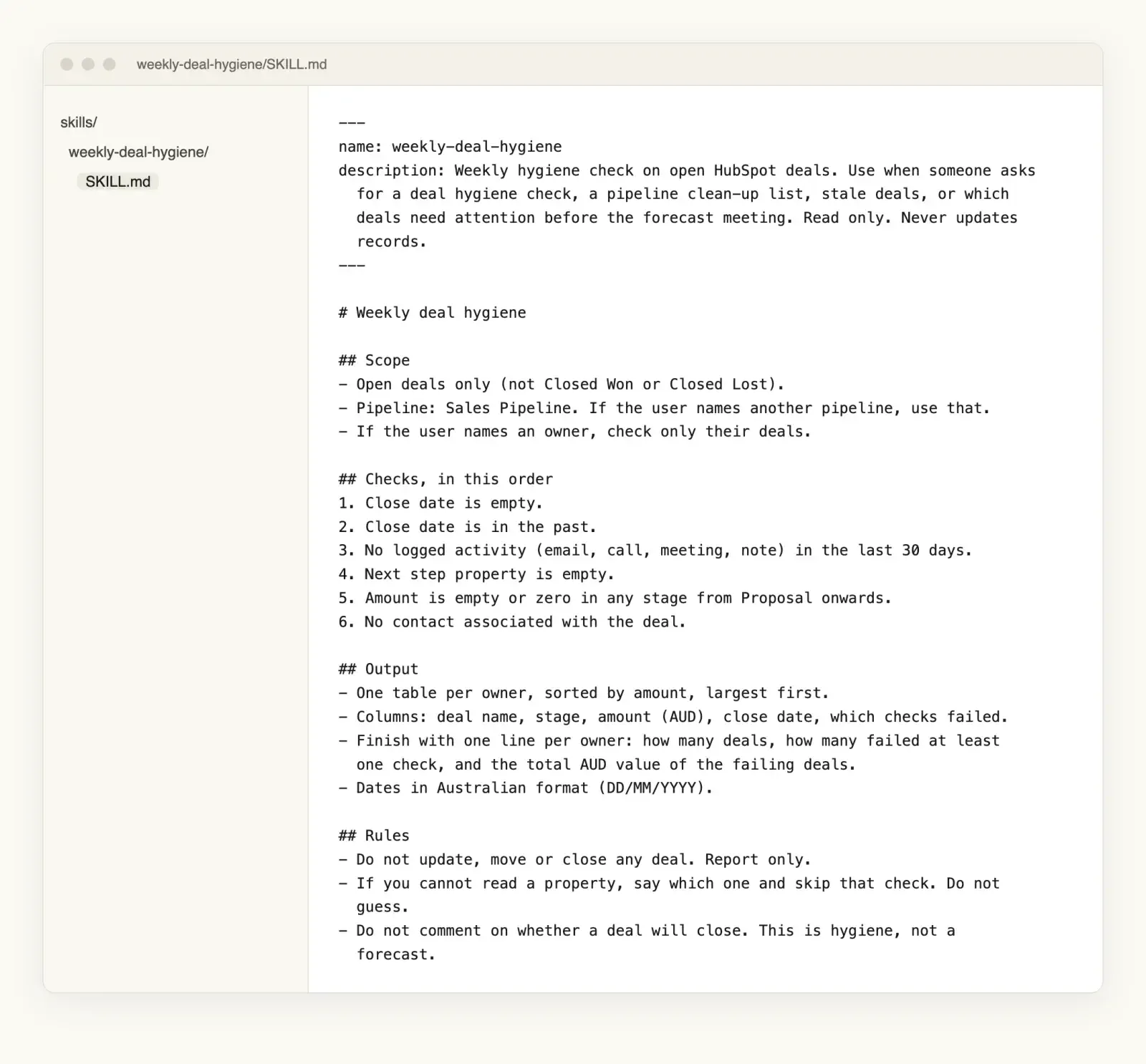
Here is a complete SKILL.md for the first job on that list. It assumes Claude can read your HubSpot deals, through the HubSpot connector or an MCP server. If it cannot, export open deals to a CSV and the same Skill works on the file.
---
name: weekly-deal-hygiene
description: Weekly hygiene check on open HubSpot deals. Use when someone asks
  for a deal hygiene check, a pipeline clean-up list, stale deals, or which
  deals need attention before the forecast meeting. Read only. Never updates
  records.
---

# Weekly deal hygiene

## Scope
- Open deals only (not Closed Won or Closed Lost).
- Pipeline: Sales Pipeline. If the user names another pipeline, use that.
- If the user names an owner, check only their deals.

## Checks, in this order
1. Close date is empty.
2. Close date is in the past.
3. No logged activity (email, call, meeting, note) in the last 30 days.
4. Next step property is empty.
5. Amount is empty or zero in any stage from Proposal onwards.
6. No contact associated with the deal.

## Output
- One table per owner, sorted by amount, largest first.
- Columns: deal name, stage, amount (AUD), close date, which checks failed.
- Finish with one line per owner: how many deals, how many failed at least
  one check, and the total AUD value of the failing deals.
- Dates in Australian format (DD/MM/YYYY).

## Rules
- Do not update, move or close any deal. Report only.
- If you cannot read a property, say which one and skip that check. Do not
  guess.
- Do not comment on whether a deal will close. This is hygiene, not a
  forecast.
Upload it and anyone on the team can type "run the deal hygiene check for Sarah's deals" and get the same six checks, in the same order, in the same table.
Notice the last section. Half the value of a Skill is the list of things Claude must not do. Without "report only", a helpful model with write access might tidy a close date for you, and now nobody knows which dates are real.
Which of your checklists would you turn into a Skill first?
The best ones already have a right answer and someone who reads the output.
How we package our own processes
We build on Claude, and we run our own repeatable work this way, from portal audits to meeting notes. Take the portal audit. A few things we learned building it apply to any Skill you write.
Check access before anything else. The audit's first step runs a script that checks the HubSpot key has every permission the audit needs. Fifteen seconds up front saves finding out forty minutes in that the deal data was unreadable and every count is wrong. If your Skill depends on a connection, make step one "confirm you can read X, and stop if you cannot".
Put the numbers in scripts. Anything that must be exact, like a count of contacts with no owner or a health score out of 100, comes from a script that Claude runs and reads the result of. The model writes the explanation. It does not do the arithmetic from memory.
Keep the main file short. The scoring rubric and the benchmarks each live in their own reference file. SKILL.md says when to open them. Claude reads the rubric when it is scoring and ignores it the rest of the time.
Write the runbook in order. Ours is numbered start to finish, so the person running it never has to come back and ask what happens next. When a step changes, it changes in one file, and everyone gets the new version.
Keep a changelog. A Skill is a process, and processes change. When the output looks different from last month, the changelog tells you whether the Skill changed or the data did.
Where do Skills run, and how does the team get them?
| Where | How you add a Skill | Who gets it |
|---|---|---|
| Claude apps | Zip the folder and upload it under Customize, then Skills. Code execution has to be switched on. | You. On Team and Enterprise plans, owners can provision a Skill for everyone, and you can share one with colleagues or submit it to your organisation's library. |
| Claude Code | Drop the folder in ~/.claude/skills/ for yourself or .claude/skills/ in a project. | Anyone working in that project, or anyone who installs it as a plugin. |
| Claude API | Upload through the Skills API. | Everyone in the API workspace. These run with no internet access. |
A Skill uploaded in one of these is not available in the others. If your sales team lives in the Claude app and your RevOps lead lives in Claude Code, load it in both, from the same folder, so the two copies cannot drift.
What should you check before you give a Skill to the whole team?
Treat a Skill like software, because it is. Anthropic's own advice is to use Skills only from sources you trust, and to read every file in one you did not write, since a Skill can tell Claude to run code or use tools in ways its description does not mention.
Then run it properly before you roll it out:
- Start read-only. A Skill that reports is safe to get wrong. A Skill that updates 400 deals is not. Add write steps later, one at a time, each with a person approving the change.
- Test it on last month. Run it against a week you already reviewed by hand. If it misses something you caught, fix the steps before anyone relies on it.
- Put it on your AI register. The National AI Centre's Guidance for AI Adoption asks Australian organisations to keep a register of the AI systems they use and records of how they manage them. A Skill that runs every week and feeds a forecast meeting belongs on that list, with a named owner.
- Name who can change it. One owner per Skill. Everyone else suggests edits.
We wrote about how we test an AI agent before it goes near a customer, and most of that applies here. If you do not have an AI policy yet, start with a one-page version before your team is running a dozen Skills nobody has signed off.
And if Claude is reading your CRM directly, check the data first. These are the five checks we run before anything automated touches a portal. For how we connect HubSpot to Claude and what we limit it to, see our write-up of the MCP build.
So which process in your business is still living in one person's chat history?
Frequently asked questions
Is a Claude Skill the same as a Claude Project? No. A Project gives Claude background files and instructions for the chats inside that Project. A Skill is a packaged procedure that Claude loads in any chat when a request matches its description.
Do you need to code to write a Skill? No. SKILL.md is a plain text file with two fields at the top and steps underneath. Scripts are optional, and worth adding only for steps that need an exact answer, such as counts and scores.
Can a Claude Skill change records in HubSpot? A Skill does not give Claude any access by itself. It can only use the connections Claude already has. If Claude has write access to HubSpot, a Skill can tell it to update records, which is why a new Skill should start read-only.
Do Skills work across the Claude app, Claude Code and the API? Yes, but separately. A Skill uploaded in one is not available in the others, so you add it in each place your team uses, ideally from the same source folder.
Sources
- Agent Skills overview, Anthropic, for the SKILL.md format, field limits, progressive disclosure, where Skills run and the security guidance.
- Use Skills in Claude, Claude Help Centre, for plans, uploading a Skill and sharing it across a Team or Enterprise organisation.
- Guidance for AI Adoption: foundations, National AI Centre, for the six essential practices and the AI register.
Got a process you want Claude to run the same way every time? Talk to us and we will help you write the first Skill.
Is your process written down anywhere Claude could read it?
That is usually the real first step, and the hardest one.