

How to Add a Traffic Light System to HubSpot Deals Without a Sales Seat
Object Tags are a Sales seat feature, so anyone on a Core seat cannot see them. A dropdown property full of emojis and one workflow gives the whole team the same colour coding.

Why is this hack helpful?
If your team is not all on Sales seats, HubSpot’s native Object Tags are invisible to half of them. Tags are the built-in way to visually label any object, Deals included, and they are a Sales Seat feature. On a Core Seat you cannot see or use them.
That gap matters because seat mix is how most companies hold HubSpot spend flat while headcount grows. Say six of your twelve users only ever need to read the deal board rather than work it: they sit on Core seats. Check the monthly difference between a Core and a Sales seat on HubSpot’s AUD pricing page, multiply it by six, and that is what this workaround is worth every month. No Australian law or ruling touches any of it, this is a licensing decision and a bit of UI.
Do you know which HubSpot seat each person has?
Seat mix is the bill nobody checks between renewals.
The workaround is a custom property full of emojis, kept up to date by a workflow. Urgency, time sensitivity or overall deal health, readable by everyone on any seat.
Steps to Set It Up
This Hack works with all objects in HubSpot, including the new Activatable Objects, but, for our example below, we will create it for Deals.
1. Create a Custom Property
- Head to Settings > Properties in HubSpot
- Create a custom dropdown property (e.g., “Deal Health”). Fill it with emojis you’d like to display on your deal card. The classic traffic light system works well:
- Red Light = Urgent or Overdue
- Orange Light = Time-Sensitive
- Green Light = Everything’s Running Smoothly
Any set of emojis works here, so pick whatever your team can read on the card without stopping to think.
2. Create Workflow
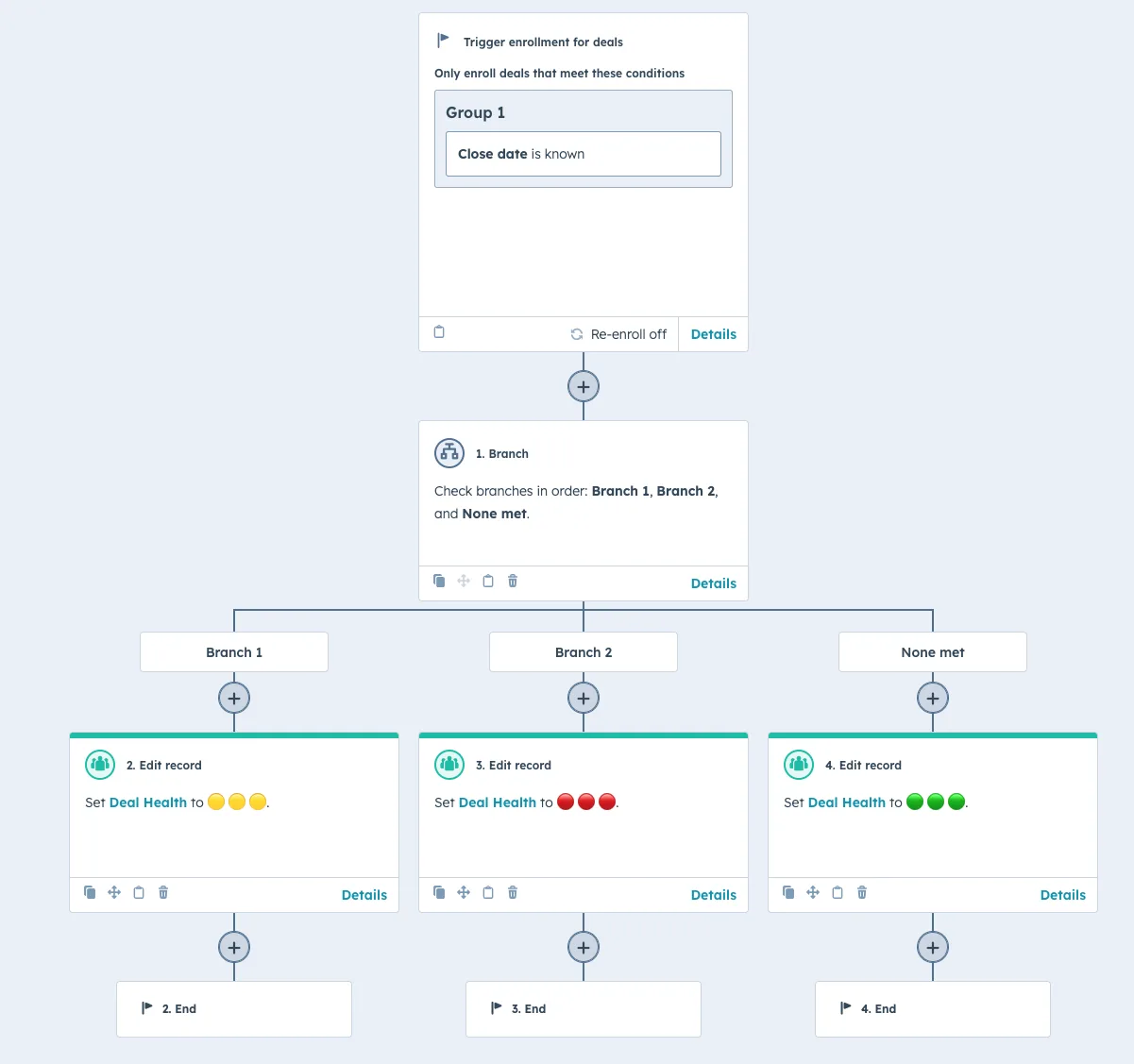
- Go to Automation > Workflows and create a new Deal-based workflow.
- Set triggers based on the deal’s properties or timeline. For example:
- Trigger: Close Date is known AND has been updated in the last day.
- Add an AND/OR Branch to categorise deals based on urgency:
- Branch 1: Close Date is more than 1 day ago AND less than 30 days from now.
- Branch 2: Close Date is more than 30 days ago.
- None Met
- Add an Edit Record Action to automatically update the "Deal Health" property with the correct emoji in each Branch.
- Branch 1: Assign the Orange emoji.
- Branch 2: Assign the Red emoji.
- None Met: Default to Green.
- Save your workflow and enrol all existing contacts to get the most up-to-date information.
Bonus tip: To remove the emojis if the deal is won or lost, you can create a separate workflow that uses the trigger of Deal Stage = Closed Won OR Closed Lost. Then, use the Edit Record Action to Clear the property.
Wrapping Up
Object Tags are a good feature if everyone in the business has a Sales Seat. Where they do not, a custom property, a handful of emojis and one workflow give Core Seat users the same read on the pipeline, and you choose what each colour means, which the native tags do not let you automate.
It takes about ten minutes to build. Three others in the same family are worth a look: tagging hot leads directly on your deal board, moving deals automatically based on an upcoming date, and notifying multiple owners when a deal changes.
Sorting out a portal's seat mix and the workarounds holding it together is how NBH builds RevOps and HubSpot systems.
How many other workarounds is your portal carrying?
How many other workarounds is your portal carrying?
A hack like this one usually has five siblings in the same portal.
A hack like this one usually has five siblings in the same portal.