

How to Update a Single Deal Without Touching Every Associated Record
Sometimes a form needs to update one deal on a contact without the same change hitting every other deal attached to them. Association labels are how you pick the live one.

Step-by-Step Tutorial
If a contact may be associated with multiple deals over time, you can use Association Labels to flag which deal is currently 'live', and should be updated, versus closed deals.
Scenario
For instance, at an RTO, a deal is created when a student submits a form, which indicates they are interested in enrolling in a course. An RTO is a Registered Training Organisation, one of the training providers ASQA regulates, and it is a good example here because the same student often comes back for another qualification years later.
Do your contacts sit across more than one deal?
That is where a property update ends up on the wrong deal.
As they progress through the sales/enrolment process, they submit several forms, which need to update information on this deal for future record-keeping and reporting purposes.
After they've enrolled and completed their study, they may come back to do an additional course, and we need to make sure that only their current deal is updated, and the closed-won deal is left as-is.
To do this, we're making a couple of small changes to the existing process:
1. First, Create Association Labels
You'll need to create 2 Association labels, one to indicate a live deal, and one to indicate a closed deal. We went with "Active" and "Completed" for the two association labels.
2. Next, Create a Workflow
Create a workflow that triggers if a deal is in any of your non-closed deal stages. Add "Apply Association Labels" action to set the "Active" association label between the deal and the contact.
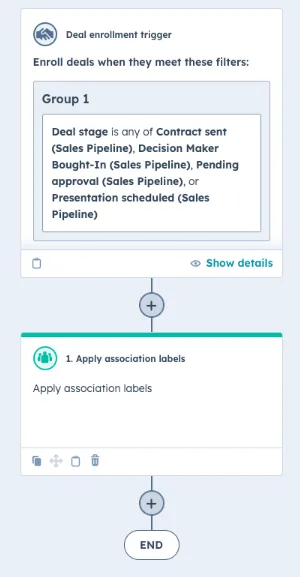
3. Set up a Closed Deal Workflow
You then need to set up a similar workflow for deals that are in a closed stage. This time you'll need to add a 'remove association labels' step, and remove the "Active" label (though don't remove the association entirely).
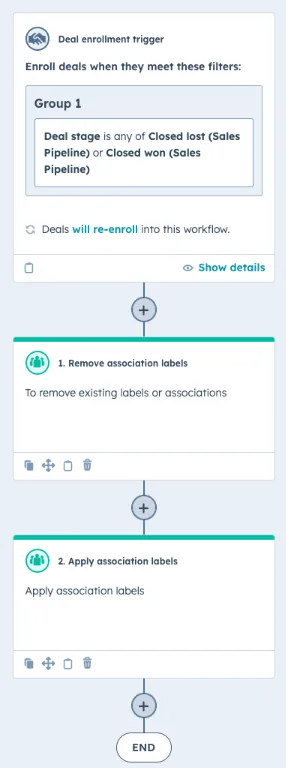
4. Turn on Workflows
Activate both workflows, and enrol all existing records so the label is set for all your current deals as well.
5. Copy Information to Active Deals
Finally, go into the workflow/s that copy contact information to the deal. In the 'edit record' actions, update the "Association to Object" dropdown to be "Active" instead of "All deals".
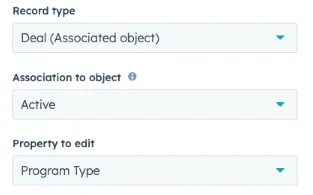
With this change, only active deals will be updated by the workflows, leaving any information on closed deals unchanged.
The same logic can be applied to other scenarios, such as managing deals for different product offerings by creating unique association labels for each product. If the association is the thing you are keying off, it is worth reading next to matching associated records by number, a companion technique, and a related custom workflow build using the same association logic.
Not sure your association labels are set up for this?
Most portals have labels nobody has touched since onboarding.
That keeps your data clean, and every workflow only touches the deal that is still open. Once the right deal is the one being updated, notifying every owner once the right deal is updated is the next piece to put in.