

The 8 Social Ad Moves We'd Actually Spend Budget On
Eight paid social moves that tie back to real deals in HubSpot, plus the Australian privacy step to take before you upload a single customer list.

Most social advice is written for somebody whose job is to post every day. If your job is deciding where a budget goes, there are about eight moves worth paying for, and every one of them starts with data you already own.
Here they are in the order we would work through them. Most end in a number you can find in HubSpot, so in six weeks you can tell whether it worked.
1. Retarget the people who already came to your site
The cheapest pipeline in paid social, every time. Your HubSpot tracking code already knows who visited which pages. Connect your Meta, LinkedIn and Google ad accounts to the HubSpot ads tool, then build audiences out of that behaviour: visited the pricing page, visited a service page twice, opened the proposal email and went quiet.
Because the audience is built from a HubSpot list, it keeps itself current. Someone who becomes a customer drops out of it. Someone who reads your pricing page tonight is in it tomorrow.
Start here even on a small budget. Modest traffic still gives you a usable retargeting audience, and each platform will tell you when a list is too small to serve. Nothing else you can buy is that warm.
2. Do the privacy step before you upload a customer list
Nobody writes about this, because the guides are American.
Uploading customer emails or phone numbers to build a Meta Custom Audience or a Google Customer Match list is a disclosure of personal information to a third party. In Australia that sits under the Australian Privacy Principles, and APP 6 is the one that bites: you can use or disclose personal information for the purpose you collected it for, or for a related secondary purpose the person would reasonably expect. APP 7 then covers direct marketing on top of that.
In practice, before the upload:
- Check that your collection notice and privacy policy actually say you may use contact details for marketing. If somebody handed over an email to get a quote, advertising to them is defensible. Handing their mobile number to an ad platform is a bigger step, and it should be a deliberate one.
- Strip out anyone who has opted out of marketing in HubSpot. An unsubscribe is about your intent, and pushing that person into an ad audience is the same intent by another route.
- Keep a record of which list went to which platform, and when.
- Delete the audience when the campaign ends and rebuild it from HubSpot next time. A two year old customer list sitting on an ad platform is a liability with no upside.
Ten minutes of work, and it is the difference between ordinary marketing and a privacy complaint with your name on it.
3. Seed the lookalike from customers you actually won
A lookalike audience is only as good as its seed, and most are seeded from everyone who ever filled in a form. That teaches the platform to go and find people who fill in forms.
Seed it from a HubSpot list of Lifecycle stage is Customer, filtered to deals at or above your average amount. A few hundred of your best customers will beat every lead you ever collected, as a seed.
Then leave it alone for a fortnight before you judge it. A lookalike needs spend behind it before the result means anything.
4. Exclude your own customers and your open deals
Two suppression audiences, built once:
- Everyone at Lifecycle stage Customer
- Every contact with an open deal
Apply them to every prospecting campaign. You stop paying to advertise a first meeting to somebody who already has your proposal, and you stop the email that starts "why are you advertising something I already bought".
Most portals we look into are not doing this. It is the fastest saving on the list and it takes about ten minutes.
5. Write one ad for each closed lost reason
Which of these 25 would your team stick with?
Anyone can post a series for two weeks, week six is the test.
Open the Closed lost reason property, group the values and count them. You now have a creative brief written by the market.
Price becomes an ad with a number in it. Timing becomes an ad about what waiting costs. Went with a competitor becomes a comparison. No budget this year becomes something small they can buy now and grow into.
This is the move that stops paid social feeling like shouting, because you are answering the objection that is genuinely losing you deals.
6. Three creative formats that survive a paid feed
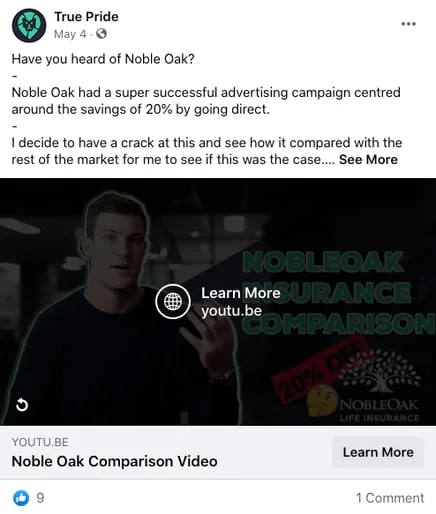
Short video with one call to action. A few seconds of something real and one thing to click. Our friends at True Pride took Noble Oak's claim about savings of 20 per cent from going direct, tested it against the rest of the market on camera, and let the comparison make the argument.
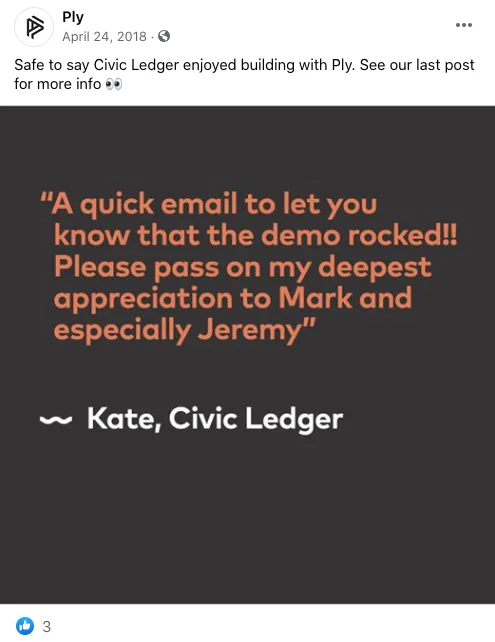
A customer quote, set as an image. No design skill required, and it carries proof that the same words in your own voice cannot. Our office neighbours Ply do this properly.

One number, big. If you have original data, one figure on a plain background will outrun almost anything you can design. The Economist does it with a flat colour panel, the source named in the corner, and the argument in the caption.
Whichever format you pick: one ad, one idea, one click. A creative carrying three messages is a creative you cannot learn anything from.
7. Send the click to a HubSpot form so the spend ties to a deal
An ad pointing at your homepage teaches you nothing. Send it to a page with a HubSpot form on it and three things become true at once: the contact is created with an Original source of paid social, the ad interaction appears on their timeline, and any deal created later can be traced back to the ad that started it.
That is the whole reason to run paid social through HubSpot instead of reading the platform's own dashboard. Meta will tell you about a conversion. HubSpot will tell you which of those conversions became a deal and what the deal was worth.
8. Set the number that kills the campaign before you launch it
Write it in the brief, in pipeline terms: cost per deal created, and the figure it has to beat. If you do not have one yet, take last year's spend on the channel and divide it by the deals it produced. Ugly is fine. A rough number you argue about beats a dashboard nobody opens.
Review fortnightly for the first six weeks, then monthly. Cost per thousand impressions and cost per click are diagnostics that explain why the real number moved. They are not the number.
What we stopped spending on
Since this is a budget conversation, here is where we have wasted money ourselves.
- Boosting organic posts. It buys reach on a post written for people who already follow you. Build the audience deliberately and put the money there.
- Broad interest targeting for a considered purchase. Interests find people who like the topic. Your CRM finds people who buy.
- Being on a platform because it is new. If you sell to cashed up investors in their fifties, they are not the audience on the newest app, and a lip synced video from your sales director will not move them. We have watched real estate agents test this theory in public.
- Giveaways as a growth tactic. You buy followers who wanted the prize and unfollow in a fortnight. If you run one anyway, check the trade promotion rules in every state you are running it in first.
None of that is a law. It is what our own numbers said, and yours may say something different, which is the entire reason for putting a number on a campaign before it launches.
Where to start this week
Build the two suppression audiences, then the retargeting audience. That is an afternoon, it costs nothing, and it makes every campaign after it cheaper.
Not sure which of these actually brought in customers?
Social posting rarely gets tied back to a single new customer.
Then the harder question. If you had to defend next quarter's social budget with one number from your CRM, which number would you reach for, and could you find it today? More paid and organic strategy is on the NBH learn hub, and RevOps is the part where we make that number findable.