

Turn Contract Start Dates Into Automatic Renewal Alerts in HubSpot
A calculated property works your contract end date out from the start date, so a $48,000 a year agreement cannot roll over while nobody is watching. Here is the formula and the three properties it needs.

Take a services contract worth $48,000 AUD a year, GST inclusive. The renewal conversation has to start months before the end date, and that end date usually lives in two places: the signed agreement, and whatever spreadsheet somebody remembers to open on the first Monday of the month.
There is no single Australian law setting renewal or notice terms. Contract law here is state based, so the only rule binding you is the one written into your own agreement. That makes the end date the thing to track, and HubSpot can work it out from the start date without anyone typing it twice.
Step-by-Step Tutorial
1. Head over to HubSpot
Log in to your HubSpot account then press the settings icon in the main navigation bar.
2. Create a "Delivery Term" Property
Do you know which contracts end this quarter?
For most teams that answer lives in one person's spreadsheet.
Navigate to "Properties" in the sidebar, then Click "Create Property". Next you're going to name it "Delivery Term" and set the field type to "Number". This is where you will store the contract duration in days.
3. Set Up "Contract Start Date"
Now you're going to create another property called "Contract Start Date", and choose "Date" as the field type.
4. Configure "Contract End Date"
Create a property for the end date. Next you're going to name it "Contract End Date" or whatever suits your needs. Then Select "Calculated property" for the field type and select "Date" for the data type.
5. The Magic Formula
Next you are going to insert the following formula into the editor:
[properties.contract_start_date] + ([properties.delivery_length] * 86400000)
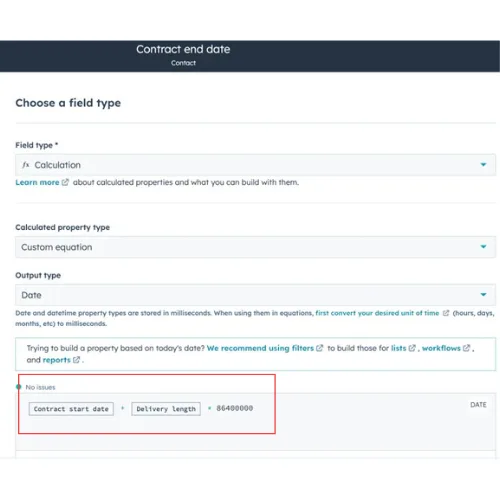
How it Works
[properties.contract_start_date] : The start date of the contract
+ : Addition Operator
[properties.delivery_length] : The duration of the contract in days
* : Multiplication operator
86400000 : Number of milliseconds in a day (Note: modify this if you're doing months or years)
One thing to check before you save. The formula reads each property's internal name, not the label you typed, and the two are often different. Open the property settings, copy the internal name across exactly as it appears there, and the calculation will return a date.
What to do next
With this hack in place, you can generate smart reports and display upcoming contract end dates to stay on top of renewals. Use it for forecasting to keep your revenue predictions sharp. You can also set up automatic reminders and tasks based on these end dates.
Three things are worth adding once the date calculates. Moving deals automatically based on an upcoming date walks the renewal through your pipeline as it gets closer. Building rolling date filters with scheduled workflows keeps a report permanently showing the next 90 days. And if contracts are central to how you sell, building a full contracts custom object for renewals beats holding everything on the deal record.
What this saves is concrete: one person checking a spreadsheet every month, and the $48,000 contract that gets renewed on time because the reminder fired in August instead of October. Contract values like that are normally quoted GST inclusive, and the GST portion is one eleventh of the total, about $4,363 on $48,000, which is the figure you are already reporting to the ATO on each BAS. Getting the end date wrong is the sort of error a client spots before you do.
If you would rather have the whole renewal motion built than the one property, that is how NBH builds RevOps and HubSpot systems.
Not sure your start dates are all in HubSpot?
Not sure your start dates are all in HubSpot?
Most portals have a few deals where that field never got filled.
Most portals have a few deals where that field never got filled.