

Jev sorted 184 HubSpot leads in 9 seconds for under a cent
Jev is a new kind of AI that never writes a word. It reads text and answers your questions with a probability attached. We tested it on 184 real enquiries to see where it fits in a sales process.

Jev sorted 184 of our real website enquiries in under nine seconds, for less than one US cent, and got 92.7% of them right.
How we asked mattered more than the model. One broad question got 86.4%. Four narrow ones, combined in code, got 92.7%, and were sure enough to act on without a person for 104 of the 177 leads we could check.
This piece covers what a decision model is, where it sits in a HubSpot setup, how we tested it, and where it went wrong. Jev launched in September 2026 and is changing quickly, so treat every number here as true in the first week of October.
A model that answers and never writes
Most of the AI people use at work writes things. ChatGPT, Claude and HubSpot's Breeze take a prompt and hand back paragraphs. Jev, from a US company called TypeSafe, does none of that. You give it some text and a list of questions, and it gives back an answer to each one, picked from options you wrote, with a probability attached.
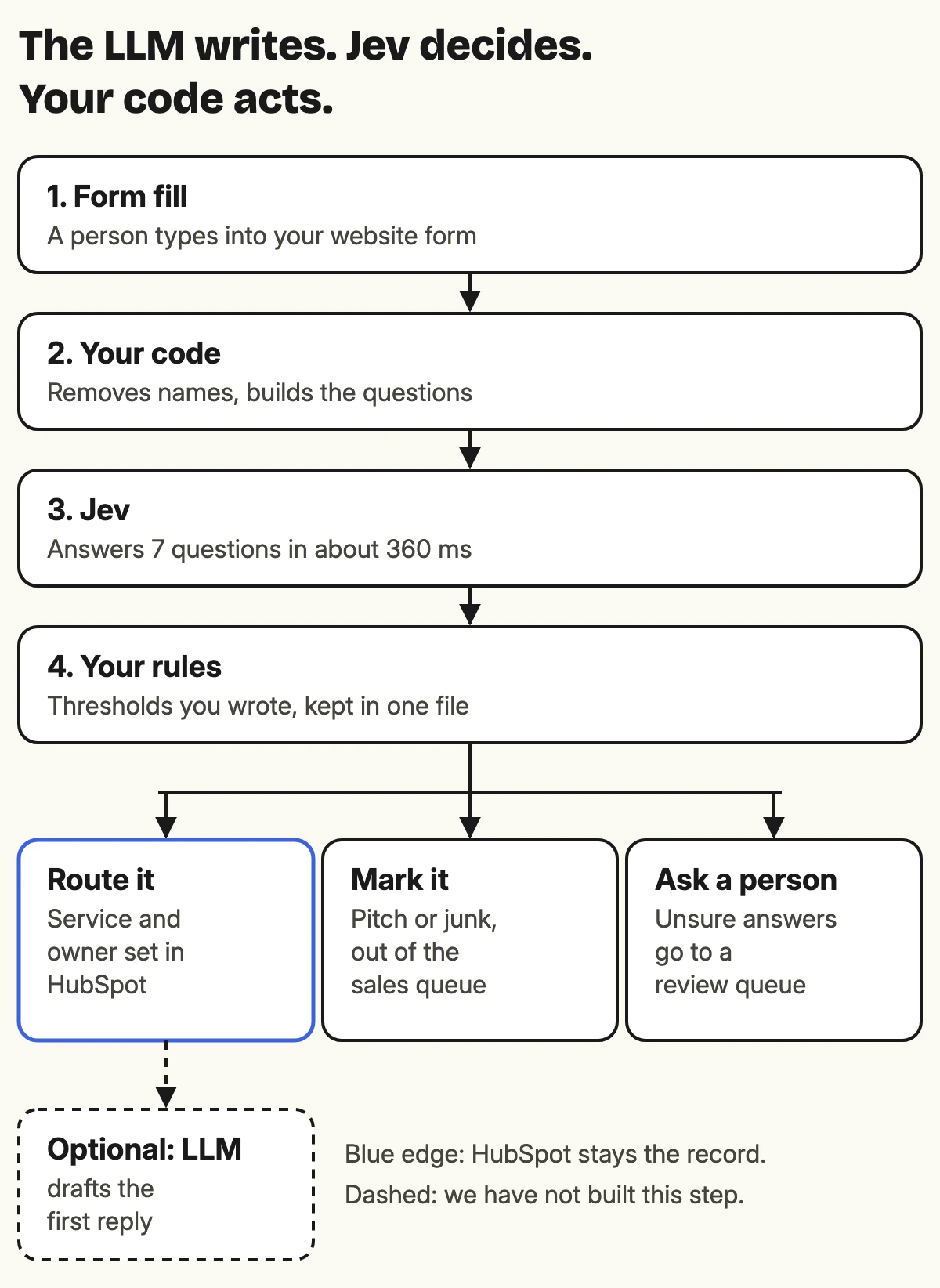
The split we work to: the LLM writes, Jev decides, your code acts.
For a RevOps team that split is familiar. A HubSpot workflow already runs this way. A trigger fires, a branch checks a property, an action runs. What a workflow has never been able to do is read. A branch can check whether a dropdown says "Enterprise", but it cannot read a free-text message and decide whether the person is a buyer or someone selling backlinks. That reading step is the gap a decision model fills.
Three kinds of question, all of them familiar
Jev answers exactly three types of question. If you have built HubSpot properties, you already know them.
| Jev type | What comes back | Closest HubSpot idea | From our test |
|---|---|---|---|
| Choice | One option from a list you wrote, plus a probability for every option | A dropdown property | Which service is this enquiry about? |
| Score | A position on a scale where you describe every level | A 0 to 4 rating with each number defined | How strong is the buying intent? |
| Noul | The probability that the answer is yes | A checkbox that also says how sure it is | Is the sender selling something to us? |
"Noul" is TypeSafe's name for a yes/no question. The useful part is the number. A checkbox says yes or no. A Noul says 0.93, which means yes and fairly sure, or 0.51, which means coin toss, ask someone.
Every answer is one of the options you defined, so your code never gets an answer it cannot handle. That does not make the answer right. It makes it predictable, which is what a workflow needs.
What a request looks like
For the technically curious, here is one of our real requests, cut down to two of the seven questions. The text in form_message had names and companies replaced before it left our side.
POST https://api.typesafe.ai/v1/systemone

{
  "model": "jev-latest",
  "state": {
    "form_message": "Marketing seat in Hubspot. Need assistance here."
  },
  "questions": {
    "own_need": {
      "type": "noul",
      "instructions": "In `form_message`, does the sender describe a problem, project or need inside their own business (or their client's business) that they want the agency's help with?"
    },
    "sells_to_us": {
      "type": "noul",
      "instructions": "In `form_message`, is the sender offering or selling their own product, service, content, link placement or partnership to the agency?"
    }
  }
}
And the part of the answer that matters:
"own_need":    { "type": "noul", "noul": 0.83 },
"sells_to_us": { "type": "noul", "noul": 0.04 }
Three things are worth knowing from that.
- Questions run in parallel. Every question about one message goes in a single call, so seven questions take about as long as one.
- The question lives in the instructions. Labels like
own_needare for your code. The model never sees them, so the whole question has to be in the sentence. - The response names the version. Ours said
jev-1.13.0. Log it on every call, because the day a new version ships, your thresholds need re-testing.
How we tested it
We took every enquiry with a written message from our own HubSpot portal between July 2025 and October 2026: contact forms, booking forms and ad landing pages. After removing tests, internal entries and client support requests, 184 were left.
Before anything left the portal, a script replaced names, company names, emails, phone numbers and web addresses with placeholders. TypeSafe says Jev is not trained on customer requests, but zero data retention is only offered on enterprise plans, so we assumed anything we sent would be kept.
Each enquiry was then labelled as a potential buyer or as a pitch or junk. 150 were buyers and 27 were pitches or junk. Seven were too ambiguous to call, mostly overseas brands asking for a performance agency in a style that matches a known scam, so they sat out of the scoring.
Every lead went to Jev with the same seven questions in one call:
- One broad yes/no: is this a genuine enquiry from a potential client?
- Four narrow yes/no checks: are they selling something to us, do they describe a need of their own, do they mention HubSpot or their systems, and are they only asking to be put through to a decision maker?
- One Choice: which service fits, including "not a client" and "unclear" as options.
- One Score: buying intent from 0 to 4, with each level written as a situation, such as "describes a specific problem with context like team size or systems in use".
One rule in code turned three of the narrow answers into a verdict: a buyer describes a need of their own, is not selling to us, and is not only fishing for a decision maker. The 184 calls ran in 8.7 seconds. The median call took 360 milliseconds from Brisbane, and the whole run cost under one US cent.
One broad question against four narrow ones
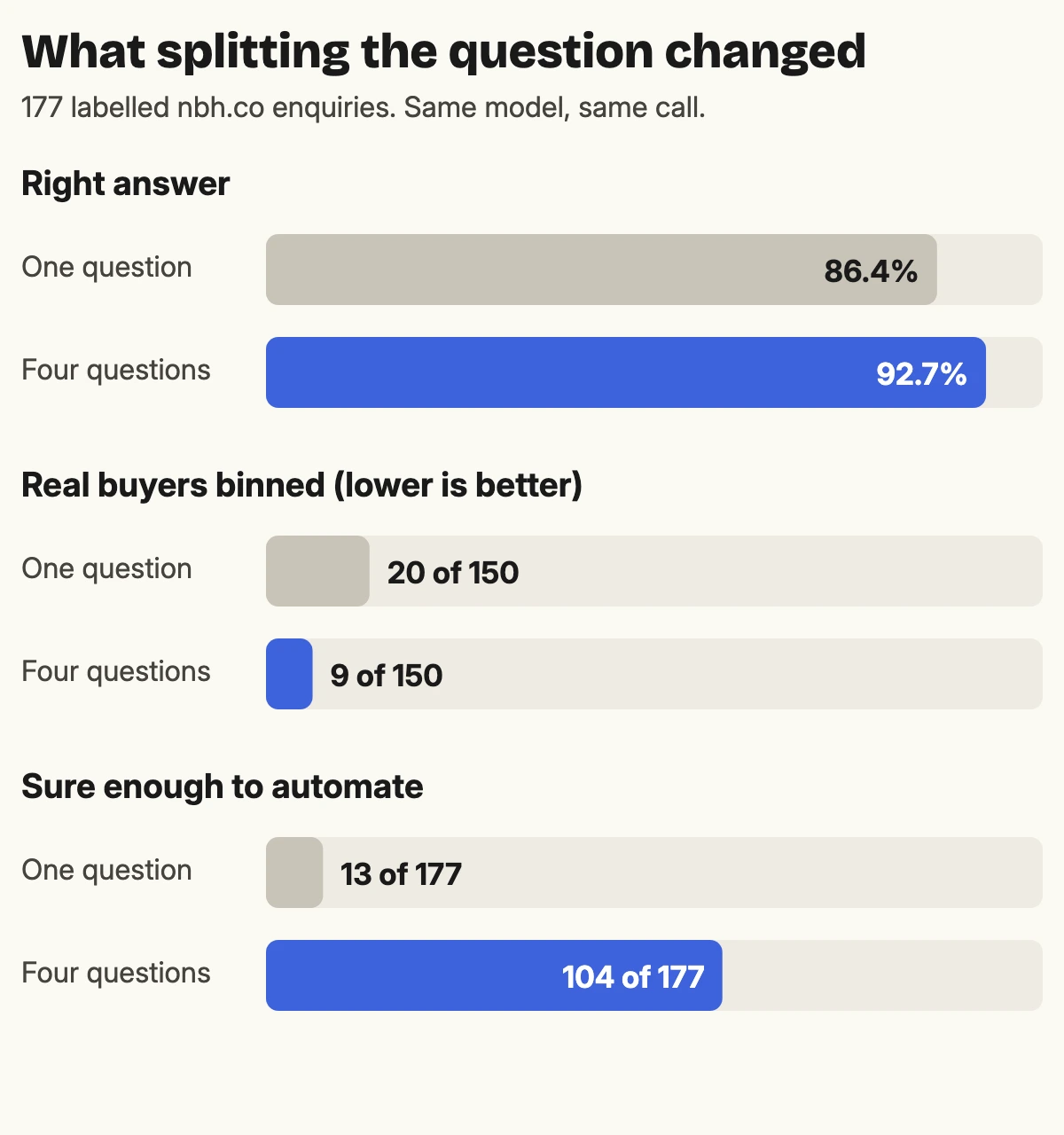
The broad question got 86.4% right. The narrow questions, combined in code, got 92.7%. The bigger difference is in the buyers: the broad question would have binned 20 of our 150 real buyers, and the narrow version binned 9.
One lead shows why. Someone wrote "Marketing seat in Hubspot. Need assistance here." Asked whether that was a genuine enquiry, Jev said 0.42, which is a no. Asked the narrow questions, it was 0.83 sure they described a need of their own, 0.99 sure they mentioned HubSpot, and gave 0.04 that they were selling something. That lead became a deal.
It works in the other direction too. A message asking only to be connected with "the appropriate decision-maker" scored 0.51 on the broad question, a coin toss. The narrow question about fishing for a decision maker came back at 0.93.
TypeSafe's documentation gives the same advice: decompose broad judgments into atomic questions and combine the outputs in code. We expected it to help. We did not expect the gap to be this wide.
The number that matters is how sure it was
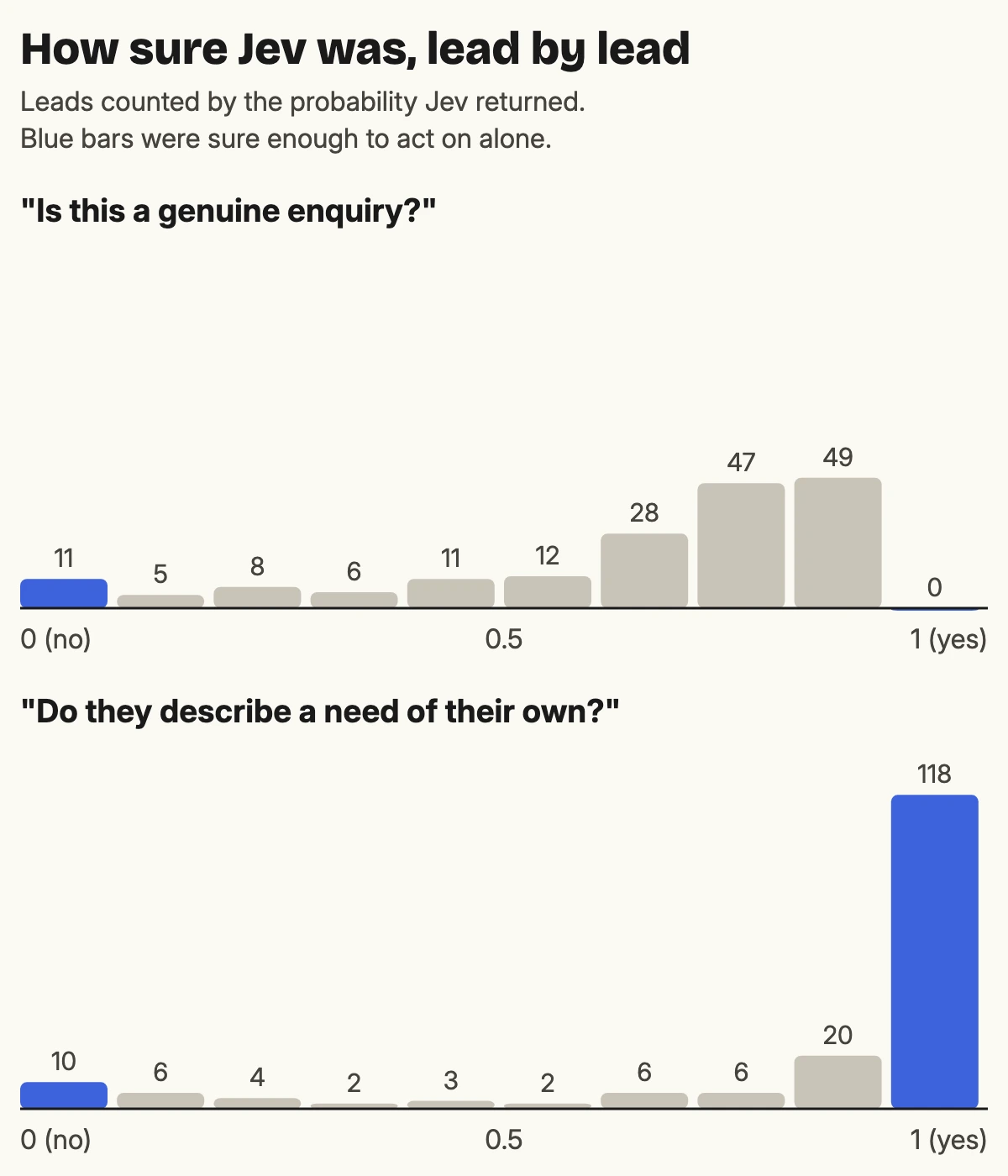
This chart is the real result. Asked the broad question, Jev was never more than 90% sure a lead was a buyer, not once in 177. Most answers landed between 0.6 and 0.9. The model was telling us, honestly, that "genuine enquiry" is a fuzzy idea.
Asked whether the sender described a need of their own, it was more than 90% sure on 118 leads. Narrow questions get confident answers, and confident answers are the ones you can automate.
That gives you a simple design. Pick a band where the system acts on its own and send everything else to a person. We used 0.1 and 0.9 on each of the three answers in our rule:
- All three outside the band: 104 of 177 leads. Jev's call was right on 98.1% of them.
- Any of the three inside the band: 73 leads, right on 84.9%. These go to someone on the team.
That is what the probability is for. A checkbox treats every answer the same. A probability tells you which answers to trust, so your team reads the 73 that need a person and stops reading the 104 that do not.
TypeSafe calls this calibration: across many answers given 0.9, about 90% should turn out right. It is a promise about groups of answers. Any single answer can still be wrong, which is why the band exists.
Which of your HubSpot fields does someone fill in by reading?
Those are the ones a decision model could fill.
Where it got it wrong
Nine buyers were binned and four pitches got through. The misses fall into patterns, and each pattern has a fix.
A pitch that reads like a need. One sender wanted help finding payment gateway providers to partner with. Jev was 0.97 sure they described a need of their own, and they did. It is just not a service we sell. The fix is one more narrow question with your service list in it: is this something the agency offers? Jev only knows what you put in the request.
A partner read as a vendor. A partner agency mentioned shared clients and a possible website project. Jev was 0.88 sure they were selling to us. That lead turned into three deals. Partner referrals look like pitches in writing, so match known partners in code, against your own list, before the message reaches the model.
A client's admin read as a new need. An existing client wrote in about calendar bookings, and Jev routed it as a HubSpot fix. HubSpot already knows this person is a customer. That check belongs in code, on the lifecycle stage, before any model is asked.
Messages with almost nothing in them. "Assist with setup" got 0.46 and "I am interested in learning more" got 0.07. Both were labelled as buyers. A message that short is a judgement call for a person too, so the honest rule is to send anything under a dozen words to someone, whatever the model says.
Our own yardstick. We hoped the buying intent score would predict which leads became deals. It barely did, and the reason was our process: we create a deal for 135 of our 150 real enquiries, so "a deal was created" says almost nothing about lead quality. To tune an intent score you need an outcome that separates good leads from bad, such as won and lost deals, and enough of them to count.
Every fix on that list is code or a better question. None of them is a bigger model.
Where it fits in HubSpot
The build is short. A form submission enrols the contact in a workflow. A custom code action sends the message to Jev, applies your thresholds and writes the answers back as properties: the service, the probability they are a buyer, and a review flag. The workflow then branches on those properties like any other.
Custom code actions need Data Hub Professional or Enterprise. We covered writing them in how to write HubSpot custom code actions with Claude. Keep the API key in the action's secrets, never in the code, and keep every question and threshold in one file so a person can review them. The questions are the part that needs the most care, so whoever knows your sales process best should write them.
When not to use it
Jev does one job, and TypeSafe is upfront about where it struggles. From its documentation and our own test:
- Anything that has to be written. Replies, summaries and call notes. Jev cannot produce a sentence, so pair it with an LLM or a person.
- Exact numbers. Counting, maths and date comparisons belong in code. TypeSafe says a Score can be compared against a threshold, but should not be read as an exact number.
- Questions that need a chain of reasoning. TypeSafe describes the model as quite literal and weak at indirection. If you catch yourself explaining what you really meant, that explanation belongs in the question.
- Decisions that need a reason on file. Jev returns a probability with no explanation. From 10 December 2026, Australian privacy policies have to disclose automated decisions that significantly affect a person. We covered that in what has to go in your privacy policy from 10 December.
- Data you cannot send offshore. TypeSafe is a US company, and zero data retention is an enterprise option. Strip what the question does not need, and check your own obligations before sending anything sensitive.
- Anything you cannot re-test. The current version is 1.13 and TypeSafe says its rate limits are still moving while demand settles. Pin a version, keep your labelled test set, and re-run it before you upgrade.
In short
A decision model reads text and answers questions you wrote, with a probability attached. For RevOps, it fills the one step a HubSpot workflow cannot take on its own: reading what a person typed.
Ask narrow questions, combine them in code, act automatically only when the model is sure, and send the rest to a person. On our own leads that cut the reading down to 73 of 177, and the 104 the system handled itself were right 98.1% of the time.
The question we are still turning over: if a model can tell you how sure it is, how many of your team's daily judgement calls are actually hard?
Frequently asked questions
What is Jev? Jev is a decision model from TypeSafe, released in September 2026. It reads text and answers questions you define, as a choice from a list, a position on a scale, or the probability of a yes. It does not write text.
How is Jev different from ChatGPT or Claude? Those models write. Jev only returns answers picked from options you supplied, each with a probability, which makes its output easy for software to act on and easy to hand to a person when it is unsure.
How much does Jev cost? In October 2026, US$0.042 per million input tokens, with output tokens free. Our test of 184 enquiries with seven questions each used about 172,000 input tokens and cost under one US cent.
Does Jev work with HubSpot? Not as a built-in feature. You call its API from a HubSpot custom code action, which needs Data Hub Professional or Enterprise, and write the answers back to properties your workflow can branch on.
Sources
- Models, TypeSafe documentation, for pricing, versions, rate limits and data use.
- Jev 1.13 jaggedness, TypeSafe documentation, for the known weaknesses.
- HTTP API, TypeSafe documentation, for the request and response format.
- Confidence, TypeSafe documentation, for how confidence and calibration are defined.
- Privacy and Other Legislation Amendment Act 2024, for the automated decision-making disclosure that commences 10 December 2026.
- Our test: 184 nbh.co enquiries from July 2025 to October 2026, run against
jev-1.13.0on 3 October 2026.
What does your team read before it can route a lead?
That reading step is the one a decision model can take.