

Create Specific Dashboards For Each Of Your Customers
Learn how to create custom dashboards for each customer in HubSpot with this insightful guide. Simplify your reporting process and make data-driven.

Rebuilding the same report for every client?
Most portals end up with a dashboard per client that nobody deletes.
Why is this hack helpful?
When managing customer relationships, having a dynamic and flexible dashboard that allows you to filter reports by different companies is a big help. In this HubSpot Hack, we'll show you how to create a custom "Company Dashboard" that, using the Quick Filters feature, enables you to easily view and analyse key metrics for each of your customers. This speeds up your reporting and keeps your decisions tied to the data for each client.
Imagine you're running a consulting firm that works with multiple companies across various industries. You have different projects, revenue streams, and customer engagement metrics for each client. Wouldn't it be convenient to have a single dashboard where you can instantly filter reports to focus on one company at a time? This hack gives you that.
Example Reports You Can Include:
We won't show you how to build out each of your reports in this Hack, however we will give you some reports we recommend including.
- Revenue by Company: Track the total revenue generated by each customer.
- Deal Pipeline by Company: Visualise the deals in the pipeline for specific companies.
- Support Tickets by Company: Monitor the number of support tickets and their resolution status for each client.
- Customer Lifetime Value (CLV) by Company: Measure the total value a client brings to your business over time.
- Engagement by Company: Analyse the level of engagement (emails, meetings, calls) you’ve had with each company.
Together these reports show how each company’s relationship with your business is going.
Step-by-Step Tutorial
1. Set Up Your Custom Company Dashboard
First, create a new dashboard in HubSpot by navigating to the Reports tab and selecting "Dashboards." Click "Create dashboard" and choose "Start from scratch." Give your dashboard a name, such as "Company Overview," and select the "Private" option to restrict access if needed.
2. Add Reports to Your Dashboard
Now, let's add the key reports mentioned earlier to your new dashboard. Use HubSpot's report library or build custom reports based on your specific needs. For example, to create a "Revenue by Company" report, go to Reports > Reports > Create report > Single object report. Select "Deals" as the object and group your data by "Company Name."
Repeat this process to add the other reports - just make sure the Company Object is always used.
3. Utilise Quick Filters for Company-Specific Insights
With your reports in place, the next step is to use HubSpot's Quick Filters to make your dashboard more interactive.
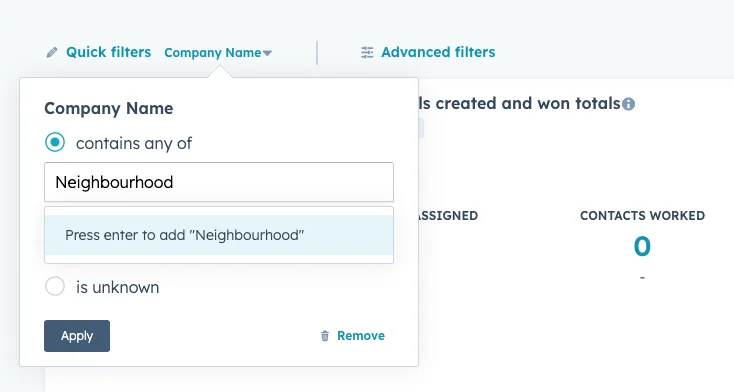
At the top of the dashboard, click on the "Advanced filters" button, then the "Quick Filters" tab. Set up your quick filter by selecting "Company" from the list of properties. This will allow you to filter all reports on your dashboard based on the selected company quickly and easily!
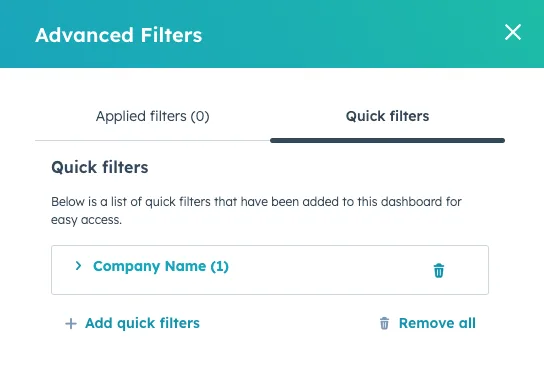
When you want to focus on a particular client, simply choose the company from the Quick Filters dropdown, and all the reports will automatically update to reflect data for that company only.
4. Share Your Dashboard with Your Team
Finally, if you want your team members to have access to these insights, you can share the dashboard with them. Go to your dashboard settings and select the "Manage sharing" option. Here, you can choose to share the dashboard with specific users or make it public for your entire team.
6. Start Making Data Driven Decisions!
Creating a custom Company Dashboard with Quick Filters lets you manage multiple customer relationships more effectively. Instead of juggling different reports or manually filtering data, you now have a single, interactive dashboard that provides instant insights into each client’s performance.
One dashboard, filtered by company, keeps your client reporting organised.
Wondering if your records could carry a Quick Filter?
Company associations are the first thing to go stale in a portal.