

Automate HubSpot Record Summaries with Breeze Copilot
A workflow that writes a plain summary of any HubSpot record and drops it into an internal email or Slack. Breeze Copilot does the reading, so nobody has to open the record first.

Steps to Set It Up
Step 1: Create a Workflow for Automated Record Summaries
Not sure your team would trust an AI summary?
Most people skim the first line and act on it anyway.
- Go to Automation > Workflows and select Create Workflow from Scratch.
- Choose the event that will trigger the workflow. Examples include:
- "Contact becomes a customer"
- "Deal reaches a specific stage"
- "Ticket is created"
- "Company property is updated"
Pro Tip: If you want to get really clever, you could use the Lead Scoring Tools in HubSpot to trigger this workflow if a contact reaches a particular score and is determined as a highly-engaged client.
If the record itself does not exist yet, that can be automated too. Here is creating the record this summary would attach to.
- Add the Summarise Record Action
- Add a new action by clicking the plus button and choosing the AI > Summarise Record action.
- This will use Breeze Copilot to generate a summary of the relevant record (e.g., contact, deal, company, or ticket).
- HubSpot has shuffled its AI actions around while consolidating everything under the Breeze name, so if the action is not sitting in the AI group in your portal, search the full action list for it by name before assuming your tier doesn't have it.
- Send an Internal Email Notification
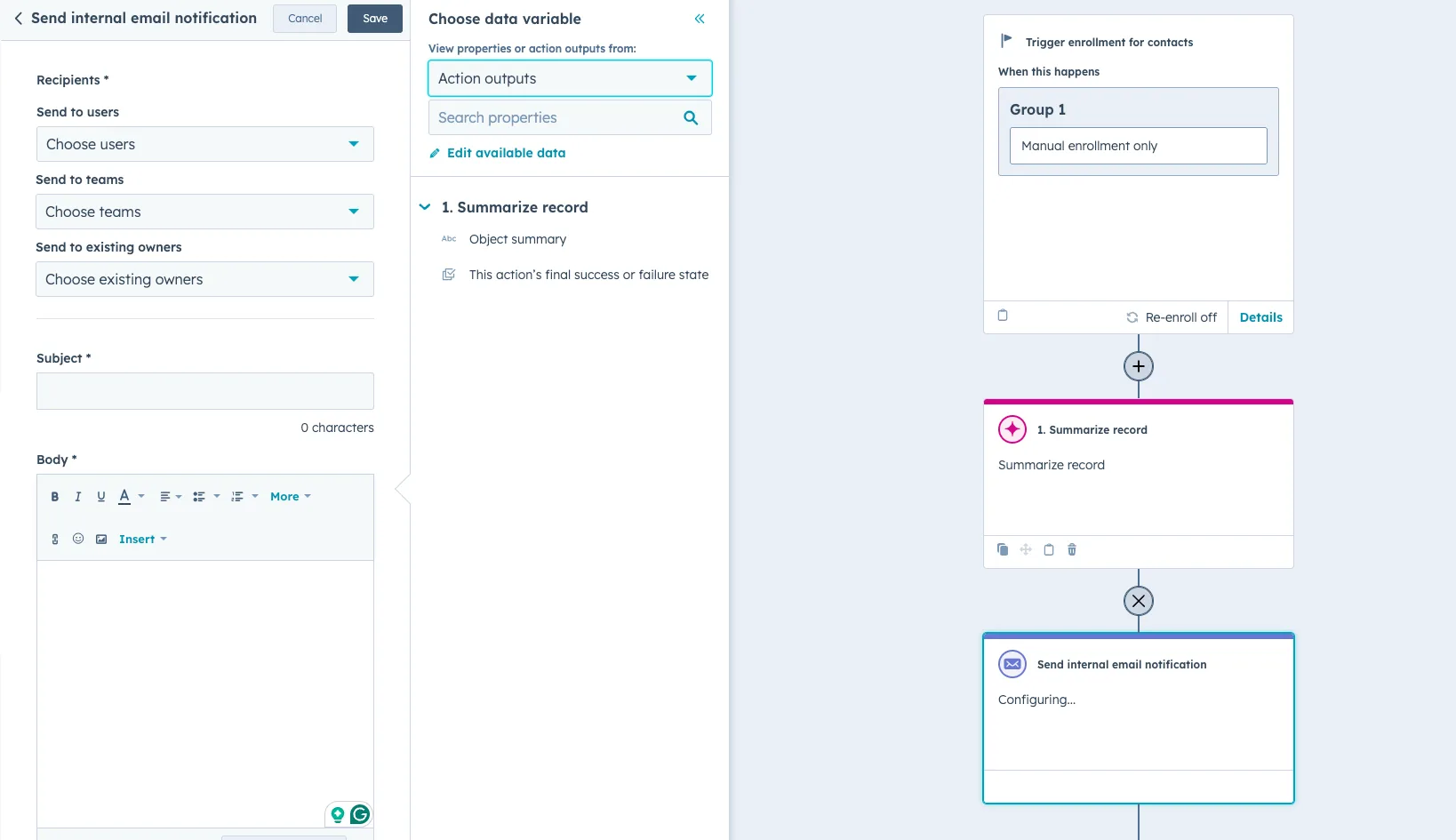
- Click the + icon again and select Send internal email notification.
- Configure the email to notify the contact owner or relevant team member.
- If you click on the body area, a sidebar will appear, and you can open the dropdown to select Action outputs. Then, you can select Object summary. This will use the output of the Summarize record action in your internal email body.
- Optional: Add Slack Notifications
- Add another "+" icon and select "Send Slack notification".
- Similar to the internal email notification, if you click on the multi-line text area, a sidebar will appear, and you can open the dropdown to select Action outputs. Then, you can select Object summary. This will use the output of the Summarize record action in your notification.
If more than one person needs to see it, the same pattern applies to notifying the right people once the summary exists.
One Privacy Check Before You Switch It On
The summary is written from notes, emails and call records, which means it is written from personal information. Under the Privacy Act 1988, APP 3 governs collecting that information and APP 11 governs keeping it secure, and neither stops applying because a workflow is doing the reading instead of a person. Two practical consequences, both worth deciding before you turn the workflow on: send the summary only to people who already have a reason to open the record, and keep it inside HubSpot and Slack instead of forwarding it to an external address. The OAIC's guidance on the Australian Privacy Principles is the reference if you need to check a specific case.
Wrapping Up
With Breeze Copilot inside workflows, the summary of a record gets written and sent without anyone opening the record. Whether that goes to the team by internal email or into a Slack channel, everyone arrives at the next conversation knowing what happened on the account.
The same trick runs in the other direction as well, as the same idea applied before a call instead of after.
Wondering which records are worth summarising?
Summarise everything and the notifications stop being read.
Set it up on one object first, watch whether people actually read the summaries, then decide where else it is worth running. If you want this built properly across several objects, that is how we build AI actions like this.