

What a HubSpot Portal Audit Actually Needs to Check at 150 People
At a 150 person company the audit's biggest finding is almost never an unused feature. It is the three workflows nobody can account for, and the contact data you are legally obliged to delete.

At a 150 person company the most useful finding in a HubSpot portal audit is almost never an unused feature. It is that three people built the same workflow in different years, two of them still run, and one is emailing contacts who asked to be left alone in 2022.
That is the gap between an audit at five people and an audit at 150. A solo HubSpot user has a tidying problem. A company with five years of portal history, four admins who have come and gone, and a marketing team that inherited someone else's naming convention has an ownership problem, and part of it is a legal one.
Here is what an audit at that size has to check, and where it stops being a checklist and turns into real work.
The four things that are usually broken
The same automation, built three times
Every portal with history has this. A workflow written in 2021 to route enquiries, a second one written in 2023 because nobody could find the first, and a third built by an agency that has since moved on. All three enrol the same contacts. Nobody has deleted any of them, because nobody is certain what would break.
What to look for: workflows with no goal set, workflows with errors in the last 30 days, workflows nobody has edited in two years that are still switched on, and any two workflows with overlapping enrolment triggers. That last one is the expensive one and HubSpot will not tell you about it. Somebody has to read the triggers.
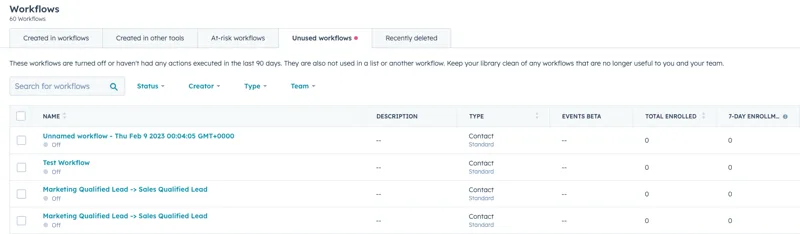
HubSpot does some of this for you. The Unused workflows tab collects anything switched off, or with no actions executed in the last 90 days, that is also unused by a list or another workflow. The screenshot above is a real portal with 60 workflows in it, and look at the last two rows: the same workflow name, twice. That is the finding, sitting in the interface, waiting for somebody to open the tab.
We wrote up auditing whether automation is actually being used separately, because at this size the question is no longer whether you have workflows. It is whether anyone can say what each one does.
Permission sprawl
Somebody needed to see a report once, so they were made a Super Admin. Then they left. Their account is still active because it owns records and automation, and switching it off breaks things nobody has mapped. Meanwhile half the sales team can export the entire contact database out of a list view and nobody has ever checked whether they should be able to.
What to look for: how many Super Admins you have, which at 150 people should be a number you can count on one hand; users who have not logged in for 90 days; former employees whose accounts still own records, workflows or dashboards; and who holds export permissions. Ownership is the sting in this one. Check what a departing user owns before the account is switched off, because ownership does not move on its own.
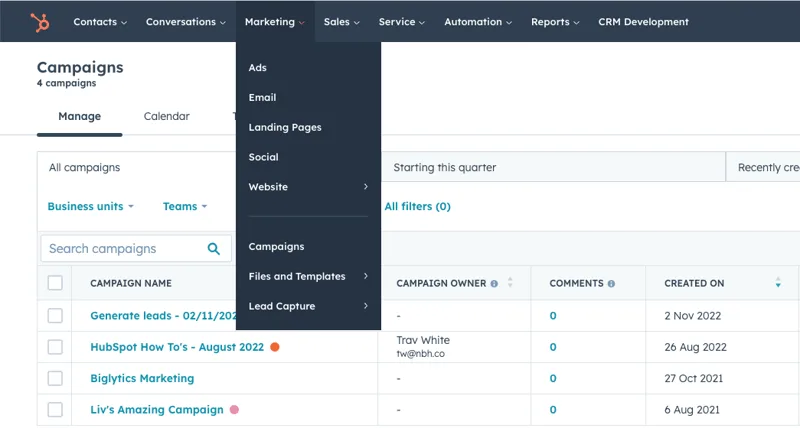
The same pattern shows up on campaigns, as above. Four campaigns, going back to 2021, and the owner column is a dash for three of them. Nobody is responsible for them, so nobody turns them off.
Reporting nobody trusts
The tell is not a missing dashboard. It is a sales director who exports to a spreadsheet before every board meeting. That happens when two reports answer the same question differently, usually because one filters on a lifecycle stage somebody redefined 18 months ago and the other does not.
What to look for: reports that sit on no dashboard at all, built once for a meeting and unopened since; two reports with the same name; dashboards with no owner; and any deal stage or lifecycle stage that people describe differently when you ask them one at a time. Ask four people what qualified means in your business. If you get three answers, the reporting is fine and the definitions are the problem.
Contact data you are legally obliged to get rid of
This one never makes it onto a tidying list, and it is the only item here with a regulator attached.
Under APP 11 of the Privacy Act 1988, an organisation covered by the Act has to take reasonable steps to protect the personal information under its control. It also has to take reasonable steps to destroy or de-identify that information once it no longer needs it for any purpose for which it may be used or disclosed. The OAIC is explicit that what counts as reasonable scales with the amount and sensitivity of what you hold, so the bigger the database, the more is expected of you.
The small business exemption turns on annual turnover of $3 million rather than headcount, and a company of 60 to 200 people is very likely over it. Worth confirming instead of assuming.
Now think about what a five year old portal is holding. Form fills from campaigns that ended in 2019. Imported lists whose origin nobody can explain. Addresses that have been bouncing since 2021. Free text notes on contact records with things in them that were never meant to become a permanent file.
Nobody decided to keep any of that. There is no retention policy, so no date ever arrives when a contact record stops being needed. The audit finding is not that your data is messy. It is that you cannot say what you hold, why you still hold it, or when it goes, and that is a question you would much rather answer during an audit than during a breach notification.
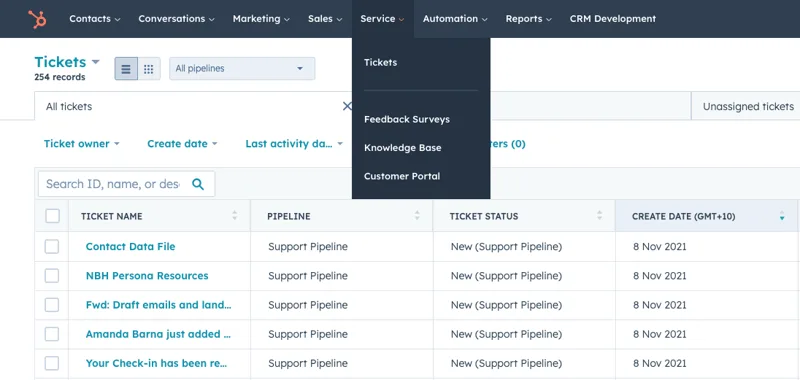
Stale records are not only a privacy problem. The ticket list above shows 254 records and every visible one is still sitting in New, from November 2021. Any service report built over that data is describing a support process that stopped happening years ago.
Found something in your portal you cannot explain?
Every portal has a workflow nobody remembers turning on.
The nine areas to check
We have been running these since 2015, so eleven years, and the list of areas has stayed fairly stable. What changes at 150 people is what counts as a finding. There is a longer version in the ten specific things we check in an audit; this is the shape of it.
1. Contacts
Required properties filled in, every record with an owner, personas being used. At this size, add three: how many duplicates you have and what is creating them, which properties are filled on fewer than one record in ten, and whether the contact owner field still means anything after two sales restructures. A property almost nobody fills in is a report that lies.
2. Marketing
Ads and social accounts connected, forms and campaigns in use, results turning up where you expected them. The mid-market version: how many forms are live, how many of those sit on a page anyone visits, and which ones write to properties no workflow ever reads.
3. Email
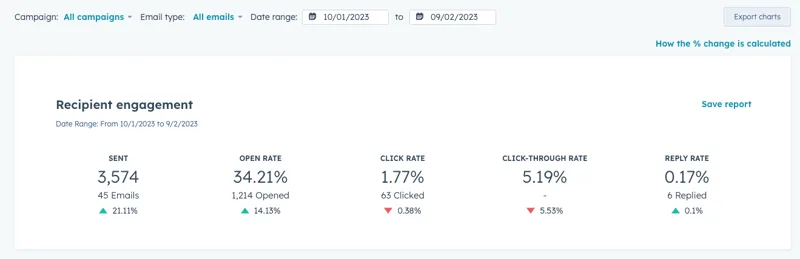
Open rates, click-through rates, unsubscribe rates and bounce rates, measured against your own history rather than an industry average. Then the contents: subject lines, body copy, the unsubscribe link and the business address, and how the thing renders in a browser and on a phone. A bounce rate climbing quarter on quarter is often the retention problem above turning up as a deliverability problem.
4. Website
Whether the site is hosted on HubSpot, and whether the landing pages, chatbots and content tools are being used or merely switched on. Landing pages nobody has visited in a year are not a housekeeping matter: they are indexed, they carry old pricing, and your buyer can find them.
5. Blog
Content performance against what you expected. At 150 people the sharper question is which posts a sales rep has ever sent to a prospect. If the answer is none of them, you have a publishing schedule and a cost centre.
6. Sales
Deal stages in an order that matches how your deals actually move, and the meetings, tasks and documents tools genuinely in use. The finding at this size is usually one stage nothing ever leaves. Everything piles up in it because it was named after a department instead of a decision the buyer makes.
7. Service
Tickets, feedback surveys, the knowledge base, customer portals. Check whether support is happening in HubSpot or still happening in a shared inbox, with HubSpot as the place someone copies it afterwards. That second pattern is common and it is why service reporting at this size is so often fiction.
8. Automation
Workflows with goals set, no errors, nothing sitting unused, and the basics covered: lead nurturing, deal automation, internal notifications. Then the harder read described above, which is overlapping enrolment.
9. Dashboards
Dashboards and custom reports set up, and every report living on a dashboard where somebody will actually see it. A report on no dashboard was built for one meeting and has been unmaintained ever since.
Where it stops being a checklist
Finding the problems is the easy half. Fixing them is where it gets political, because most of the fixes involve turning off something a colleague built.
The order that works:
- Read-only findings first. Everything you can document without changing anything. Publish the list. Name the workflows, reports and properties, with one line of reasoning each.
- Quick wins next. The changes with nothing downstream of them: naming, deleting a report nobody opens, removing a property nothing writes to. These are genuinely quick and they buy you the credibility for the next part.
- Then the deletions that need a person to say yes. Switching off a workflow that enrols a few thousand contacts is a decision with a name on it. Get the name. Write down who approved it and when.
- Then the definitions. Lifecycle stages, deal stages, what qualified means. This is the slow one, because it is four teams agreeing on a word, and it is the one that fixes reporting for good.
- Then retention. Decide when a contact record stops being needed, write it down, and build the automation that acts on it. It is the only item on this list that reduces your legal exposure.
Training belongs in this order too. Most findings at this size are not software problems: they are two admins who each learned HubSpot from a different YouTube video. If the audit turns up five things nobody knew the platform could do, the fix is a session, not a project.
When to run it
Annually is the honest answer, and there is a natural date for it. Australian businesses already stop and count things at the end of June, so an audit rides along with work that is happening anyway. If that is the window you are in, we have written up the EOFY version of this same audit.
The other trigger is a change of hands. A new head of marketing, a new RevOps lead, an agency finishing up, a hub being added. Any of those and you have just inherited decisions you cannot see.
Doing it yourself, or having someone else do it
You can run all of this yourself. The list above is the method and nothing is being held back. Two honest reasons to have someone from outside do it instead.
The first is time. Reading every workflow trigger in a five year old portal is a genuinely dull week, and it is the week that gets skipped.
The second is that an outsider has no stake in the workflow you built. We do not know who made what, which means we will happily recommend deleting something the head of marketing is still fond of. That is most of the value, and it is uncomfortable by design.
Either way, the thing that decides whether an audit was worth anything is whether something got switched off afterwards. A findings document nobody acted on is a more expensive version of doing nothing, because now the problems are in writing. That is why a portal audit sits at the front of our RevOps and HubSpot work. The output that matters is the backlog, and the backlog is what gets built.
The question to ask first
Got a list of findings and no idea what to fix first?
Most of those lists sit untouched because nothing is ranked.
Before you start, ask whoever runs your portal one question: which workflow would you switch off tomorrow if you knew it was safe?
If they have an answer ready, you already know where the audit starts. If they do not, that is the finding.